


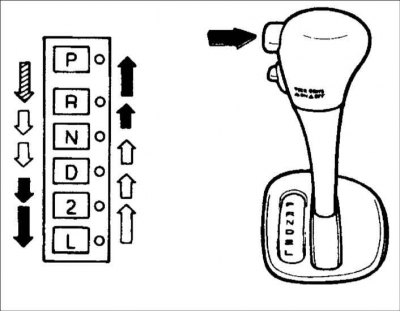
Automatic transmission mode shift lever positions
The Hyundai high-performance automatic transmission has four forward gears and one reverse gear. It has a conventional shift pattern as shown in Figure 117. At night, in the first position of the multi-function switch, the indicator on the shift pattern corresponding to the selected gear range will light.
Warning! Do not move the selector lever to the "P" or "R" position while the vehicle is moving.

To move the selector, you need to press the button while simultaneously pressing the brake pedal.

To move the selector, you need to press the button.

You do not need to press the button to move the selector.
For maximum fuel economy, accelerate smoothly. The automatic transmission will automatically engage second, third and upshift gears.
Selector Position Assignments
"R" – Parking
Use this position to hold the vehicle in place while parked or starting the engine. When parking the vehicle, apply the parking brake and move the selector lever to the "P" (Park) position.
Warning! Do not move the selector lever to the "P" (Park) position until the vehicle is completely stopped. Failure to do so may result in damage to the automatic transmission.
"R" – Reverse:
Use this position to reverse. Move the selector lever to the "R" (Reverse) position only after the vehicle has come to a complete stop.
"N" – Neutral position:
In this position of the selector the automatic transmission is disengaged. In this position it is possible to start the engine, however it is not recommended except in cases when the engine stalls while the car is moving.
"D" – "Movement", main gear:
This position of the automatic transmission selector lever is the main position for driving. The automatic transmission will automatically engage one of the four gears, providing the best economy and power. If the vehicle speed exceeds 95 km/h, never move the selector to the "2" (Second gear) or "L" (Low gear) position.
"2" – Second gear:
Use this position for driving on slippery roads, climbing steep hills and for engine braking when descending steep hills. In this selector position, automatic gear shifting occurs between 1st and 2nd gears. This means that there is no shift to 3rd gear. However, if the vehicle speed exceeds a certain value, there is a shift to 3rd gear to prevent excessive engine acceleration. Moving the selector to the "D" ("Drive") position returns to normal gear shifting.
"L" – Downshift:
This position of the automatic transmission selector lever is the main one when driving on very steep slopes and for engine braking at low driving speeds when descending steep slopes. When engaging the downshifting gear "L", the transmission will temporarily remain in the second gear range until the vehicle slows down to a speed where the downshifting gear "L" can be engaged. When driving in the "L" mode - ("Downshifting gear"), do not exceed a speed of 50 km / h.
Warning! For smooth and safe gear shifting, when moving the selector lever from the "N" or "P" position, fully depress the brake pedal before engaging a gear.
Warning! To move the selector from the "N" or "P" position to any other position, you must fully depress the brake pedal.
Warning! You can always move the selector from position "R", "N", "D", "2", "L" to position "P".
Warning! Move the selector to position "P" or "R" only after the vehicle has come to a complete stop.
Warning! Do not increase engine speed when the selector is in reverse or one of the drive positions with the brake pedal depressed.
Warning! Always press the brake pedal when moving the selector lever from the "N" position or the "P" position to another "P", "D", "2", or "L" position.
(The text is provided by the web resource: HyundaiBook)
Warning! Do not use the "P" position instead of the parking brake. Always apply the parking brake, move the selector to the "P" position and turn off the ignition when you leave the car, even for a second. Do not leave the car unattended when the engine is running.
Warning: Check the automatic transmission fluid level regularly and add fluid as needed.
Correct driving techniques
Do not move the selector lever from the "N" or "P" position to any other position while the accelerator pedal is depressed.
While the vehicle is moving, the selector lever must not be moved to the "P" position.
Before moving the selector lever to the "P" position, make sure that the vehicle is completely stopped.
Do not roll downhill in neutral. It is very dangerous. Always keep the gear engaged while the vehicle is moving.
Avoid driving with frequent abrupt braking and do not keep your left foot on the brake pedal all the time while driving. This will cause the brakes to overheat and become less effective.
On long descents, engine braking (including lower gears) should be used to prevent the brakes from overheating.
When shifting into a lower gear, slow down the vehicle slightly. Otherwise, the lower gear may not engage.
Always use the parking brake. Do not rely on shifting the selector lever to the "P" position to prevent the vehicle from moving.
Be especially careful when driving on slippery roads when braking, accelerating and changing gears. On slippery roads, sudden changes in vehicle speed can cause the vehicle to lose traction and control over the vehicle.
Turn on the overdrive switch to ensure good fuel economy and smooth running. If engine braking is required in the "D" range or if repeated shifting between 3rd and 4th gears is required while climbing a slight incline, it is recommended to turn off the overdrive. Then turn on the overdrive switch.
Warning! Losing control of the vehicle at high speeds significantly increases the risk of the vehicle rolling over.
Warning: Loss of control often occurs when two or more wheels leave the roadway and the driver attempts to return the vehicle back to the roadway.
Warning! If your car has left the road track, avoid turning the steering wheel sharply. Instead, slow down the car before re-entering the road.
When the overdrive switch is turned on, the transmission will automatically engage second, third and overdrive gears. When the overdrive switch is in the "OFF" position, overdrive will not be engaged. Under normal driving conditions, the selector should be in the "D" position and the overdrive switch should be on. If you need to make a sharp acceleration, press the accelerator pedal all the way down. The transmission will automatically engage a lower gear depending on the vehicle speed and load.