


Contents: Removal ⇓ Checking the clutch housing with…⇓ Checking the clutch disc ⇓ Checking the clutch release bearing ⇓ Checking the clutch release fork ⇓ Installation ⇓
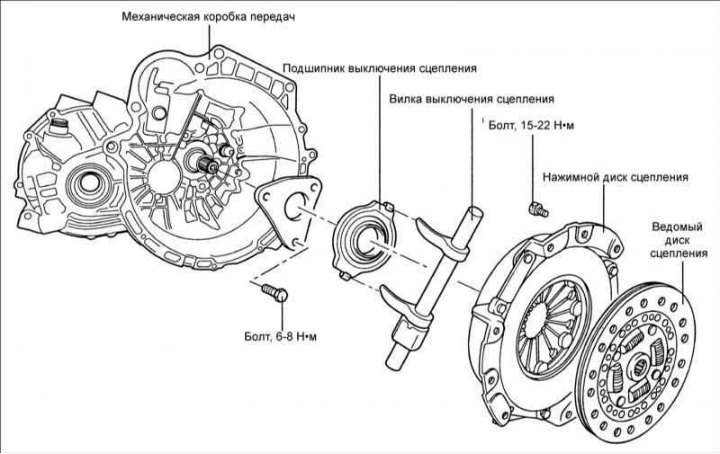
Removal
1. Drain the oil from the gearbox and the brake fluid from the clutch hydraulic drive.
2. Remove the gearbox.
3. Install the 09411–25000 clutch disc centering tool, which in this case will prevent the driven clutch disc from falling.
4. Gradually loosen the clutch assembly mounting bolts diagonally.
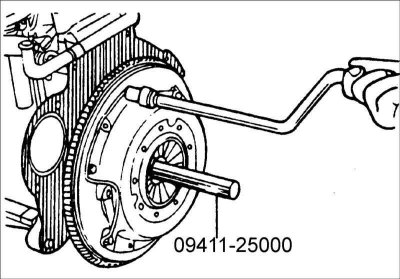
5. Loosen each bolt 1/2 turn until the diaphragm spring action is released and the bolts can be loosened by hand. Remove the clutch housing with pressure plate and the clutch disc.
Warning: Do not clean the clutch disc or release bearing with solvent.
Warning: It is advisable to remove the flywheel and check the rear crankshaft seal for leaks. Replace the sealing ring if necessary.
Checking the clutch housing with pressure plate
1. Check the diaphragm spring at the points of contact with the clutch release bearing for wear, cracks and determine the difference in height of the ends of the diaphragm spring. If there are any defects, replace the clutch housing with the pressure plate.
2. Check the pressure plate for cracks, burns and surface wear.
3. Check the reliability of the riveted connections.
Checking the clutch disc
1. Check the reliability of the riveted connections of the friction linings to the clutch disc. If there are any defects, replace the clutch disc.
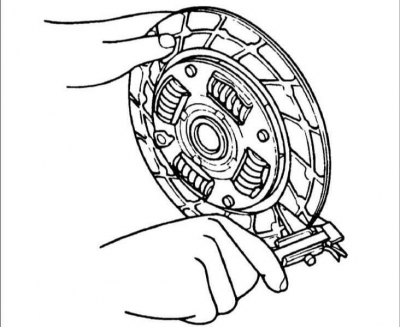
2. Measure the thickness of the brake disc.
3. Check the condition of the friction linings of the clutch disc and if there are traces of oil or mechanical damage, replace the clutch disc.
4. Clean the splines of the gearbox input shaft and install the clutch disc on the shaft. If the clutch disc moves with difficulty on the shaft or there is too much play in the spline connection, replace the clutch disc and/or the input shaft.
Checking the clutch release bearing
Warning: The clutch release bearing is sealed and must not be washed.
1. Check the condition of the clutch release bearing, which should rotate easily, evenly and quietly and should have no play. The working surface of the bearing acting on the pressure spring must be smooth, without cracks, local corrosion or wear.
2. A faulty clutch release bearing can be identified without removing it from the vehicle by pressing the clutch pedal while the engine is running. If additional noise occurs when you press the clutch pedal, the clutch release bearing is faulty and needs to be replaced.
Checking the clutch release fork
If there is uneven wear at the contact points of the release fork with the bearing, replace the release fork.
Installation
1. Apply grease to the contact surfaces of the bearing, cylinder and clutch release fork.
Lubricant: MOLYWHITE TA No. 2.
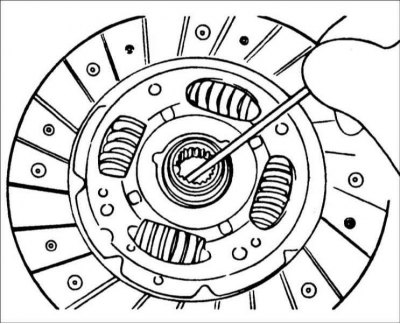
Warning: When installing the clutch, apply grease to all moving parts, but do not use excessive grease as this may cause the clutch to slip.
2. Install the clutch disc and center it using special tool 09411–25000.
The publication is borrowed from the website [HYUNDAIBOOK.ru]
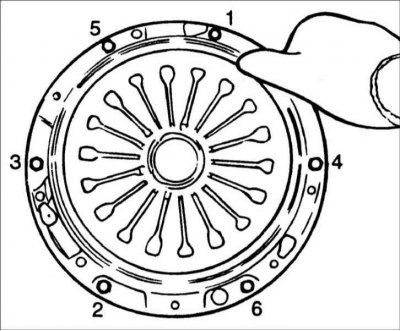
3. Install the clutch housing with the pressure plate onto the flywheel guide pins. Gradually, in a diagonal sequence and in a specific order, tighten the flywheel mounting bolts. Tightening torque: 15–22 Nm.
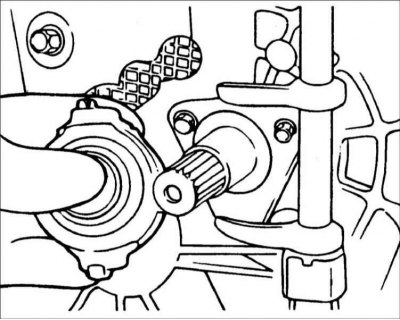
4. Connect the bearing to the clutch release fork and install it on the housing bushing.
Warning! Apply a thin coat of MOLYWHITE TA No. 2 grease to the groove of the support sleeve and the contact points of the release fork.
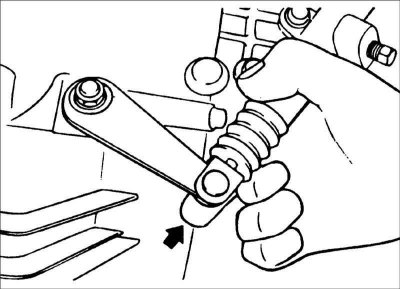
5. Install the release lever onto the clutch release fork.
Warning: If the transmission is mounted to the engine, do not perform this step as the clutch release bearing may become separated even though the release fork rotates freely.
6. Install the gearbox.
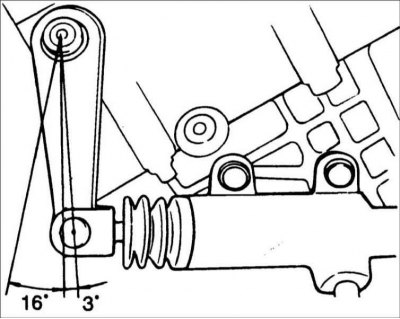
7. After performing the operations in step 6, press the release lever in the direction of the arrow and check that the clutch release bearing and housing are properly connected. The rotation angle of the release lever should be no more than 3°. If the rotation angle of the release lever is more than 3°, it means that the clutch release bearing and housing are not connected correctly.