


Contents: Turning on the speed controller ⇓ Turning off the speed controller ⇓ Restoring the set speed ⇓ Increase the set speed ⇓ Decrease the set speed ⇓
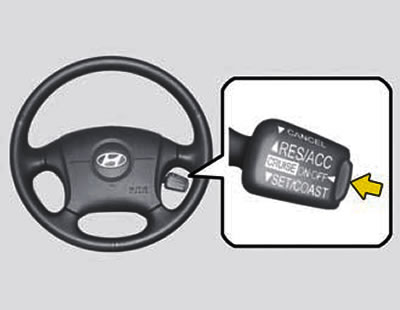
For added driving comfort, the cruise control automatically maintains a set speed when driving on highways and in other free-flowing traffic conditions. The system can be used starting from a speed of approximately 40 km/h.
Turning on the speed controller
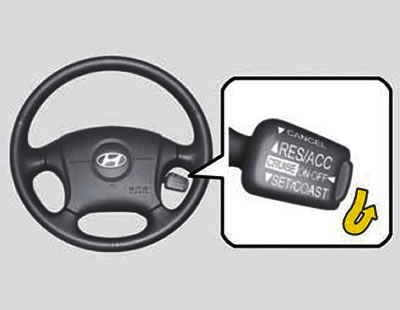
1. Press the main switch located on the end of the drum switch. At the same time, the "CRUISE" indicator light ("Speed controller") lights up in the instrument cluster. The system is enabled.
2. Increase the speed to the required value above 40 km/h.
3. Press the control switch down to the position "SET (COAST)" ("Installation (Roll-on)") and release it.
4. Remove your foot from the accelerator pedal: the selected speed will be maintained automatically.
5. To increase speed, press the accelerator pedal and accelerate the car to a speed higher than the set speed. When you remove your foot from the pedal, the previously selected speed will be restored.
Warning: To avoid accidentally turning on the speed controller when it is not needed, make sure that the main switch of the system is in the off position.
Turning off the speed controller
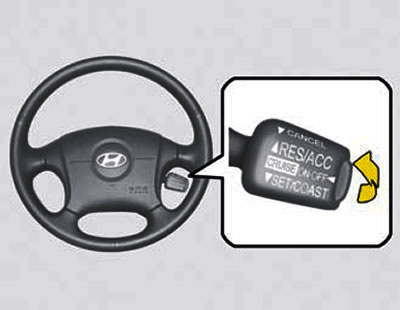
To cancel the set speed, press the system control switch toward the steering wheel to the "CANCEL" position. In addition, the cruise control can be turned off in one of the following ways:
- By pressing the brake pedal.
- By pressing the clutch pedal (on cars with manual transmission).
- By setting the selector lever to the "N" or "P" position (in a car with an automatic transmission).
- By reducing the speed of movement to less than 40 km/h.
- By turning off the system with the main switch.
Restoring the set speed
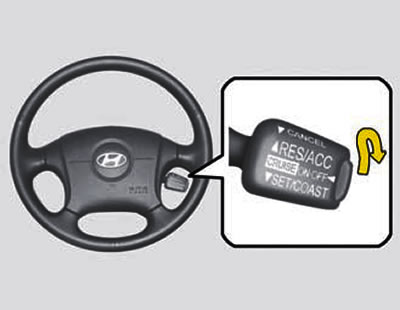
To automatically restore the speed set before cancellation, press the control switch to the position "RESUME (ACCEL)" ("Recovery (Acceleration)") and release it. In this case, the speed must be higher than 40 km/h.
Increase the set speed
1. Press the switch to the position "RESUME (ACCEL)" and hold it.
2. Increase the speed to the desired value and release the switch. As you hold the switch down, the speed will gradually increase.
Decrease the set speed
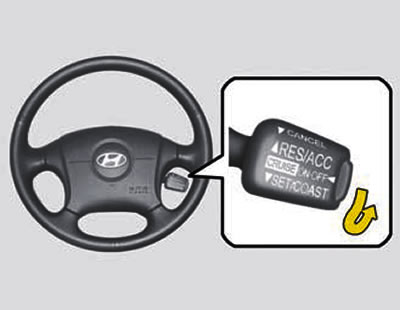
1. Press the switch to the position "SET (COAST)" ("Installation (Roll-on)") and hold it. The speed of movement will decrease.
2. Once the speed has dropped to the desired level, release the switch. Keeping the switch pressed will gradually decrease the speed.
Warning:
- If you are not using the speed controller, the main switch should be in the off position.
- Use the speed controller only when driving on uncongested highways and in good weather.
- Do not use the cruise control in conditions where maintaining a constant speed may be unsafe, such as in heavy or changing traffic or on slippery road surfaces (in rain, ice or snow) or on winding roads or on slopes greater than 6%.
- When the speed controller is on, constantly monitor changes in the road conditions.
- When the cruise control is engaged on a vehicle with a manual transmission, do not shift into neutral without pressing the clutch pedal: this will cause the engine to over-rev. If such a throw occurs, press the clutch pedal or turn off the system with the main switch.
- When you press the brake pedal while driving with the cruise control engaged, the system is deactivated, which is usually determined by a change in the engine sound. This indicates that the system is working properly.
- When the system is operating normally, it is activated after changing the speed by pressing the shoulder "SET (COAST)" switch or after pressing the brake pedal after about 3 seconds. This delay is normal.
(Original version of the article on the website: hyundaibook)