


Contents: Turning on cruise control ⇓ Disabling cruise control ⇓ Resumption of movement at a given…⇓ Increase the set speed ⇓ Decrease the set speed ⇓
Cruise control is a system of automatic control of the vehicle speed, which maintains the set speed without control of the accelerator pedal. This system is designed to create comfort when driving on highways. The system operates in the speed range from 40 km/h and above.
Note: It is not recommended to use cruise control when driving in the city, on winding and slippery roads.
Turning on cruise control
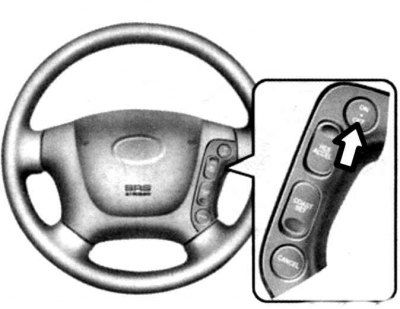
Fig. 1.104. Cruise control on/off button
To turn on the cruise control, press the "ON - OFF" switch, and the cruise control indicator on the instrument panel will light up.
Accelerate the car to the desired speed above 40 km/h.
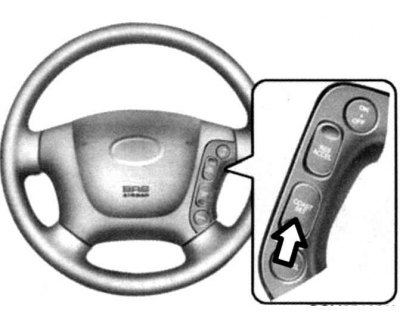
Fig. 1.105. Cruise control mode "SET" button
After setting the desired vehicle speed, press the "SET" switch ("COAST") (Fig. 1.105).
The "SET" indicator on the instrument panel will light up.
Take your foot off the accelerator pedal and the vehicle's speed will be automatically maintained.
To temporarily increase the selected speed, press the accelerator pedal. After you remove your foot from the accelerator pedal, the car will move again at the set speed.
Note: If the vehicle speed decreases by 15 km/h or more from the set speed or decreases to 40 km/h or less, the cruise control will automatically turn off.
Disabling cruise control
Cruise control can be disabled in one of the following ways.
By pressing the "CANCEL" switch.
By pressing the brake pedal.
By pressing the clutch pedal (on vehicles with a manual transmission).
By moving the selector to the "N" ("Neutral") position (on vehicles with automatic transmission).
When the vehicle speed decreases by 15 km/h or more from the set speed.
When the vehicle speed drops to 40 km/h or less.
When turning off the "ON - OFF" switch.
Resumption of movement at a given speed
If the vehicle is moving at 40 km/h or higher and the cruise control has been previously deactivated, the previously set speed can be automatically restored by pressing the "RESUME (ACCEL)" switch. While the "RESUME (ACCEL)" switch is pressed and held, the "SET" indicator on the instrument panel lights up.
Increase the set speed
Press and hold the "RESUME (ACCEL)" switch. While the "RESUME (ACCEL)" switch is pressed and held, the "SET" indicator on the instrument panel lights up.
Increase the speed to the desired value and release the RESUME (ACCEL) switch. While the switch is pressed, the vehicle gradually increases speed.
Decrease the set speed
Press and hold the "SET (COAST)" switch: The vehicle gradually slows down. While the "SET (COAST)" switch is pressed and held, the "SET" indicator on the instrument panel lights up.
When the vehicle reaches the desired driving speed, release the switch.
Caution: When cruise control is not in use, the "ON-OFF" switch must be turned off.
Warning: Use cruise control only when driving on free highways and in good weather.
Warning: It is not recommended to use cruise control when road conditions do not allow driving at a constant speed, such as in heavy traffic, strong wind, on snowy, icy, wet or slippery roads, or on a slope of more than 6%.
Caution: When using cruise control, pay particular attention to traffic conditions.
Caution! If you move the gearshift lever to the neutral position "N" without depressing the clutch pedal while driving at a set speed (in cruise control mode) on a vehicle with a manual transmission, the engine speed will increase excessively, which may cause engine damage. If this happens, depress the clutch pedal or turn off the cruise control master switch.
Caution! When driving at a set speed (in cruise control mode), if you press the SET button or press it again after pressing the brake pedal, the cruise control will resume operation after approximately 3 seconds. This delay is normal.