


Contents: "POWER ON-OFF" (power switch) ⇓ "VOLUME" (volume control) ⇓ "AUDIO Control" (tone control…⇓ "BASS" (low frequency tone control) ⇓ "MIDDLE" (tone control in the…⇓ "TREBLE" (tone control in the high…⇓ "FADER" (front/rear speaker…⇓ "BALANCE" (stereo balance adjustment) ⇓ "BAND Selector" (band selection…⇓ "BSM" (button for storing stations…⇓ "EQ" (tone correction button -…⇓ "SEEK Select Button" (automatic…⇓ "TUNE Manual" (manual frequency…⇓ Station memory buttons ⇓ Storing station frequencies ⇓
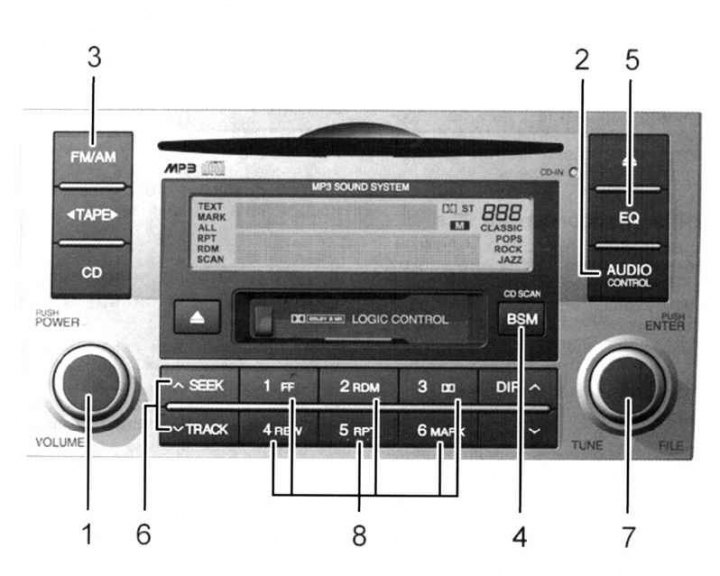
Fig. 1.109. Stereo receiver (M445): 1 – power switch, volume control knob; 2 – tone control button, stereo balance control button; 3 – range selection button; 4 – button for storing stations with the strongest signal; 5 – tone correction button (equalizer); 6 – Automatic tuning button for received stations; 7 – manual frequency tuning handle; 8 – station memory buttons
"POWER ON-OFF" (power switch)
The radio operates when the ignition key is in the "ON" or "ACC" position. Press the button to turn on the power. In the radio reception mode, the LCD display shows the frequency of the received radio station, in the CD/MP3 player mode, the number of one of the CD/MP3 tracks. To turn off the radio, press the button again.
You can press the FM/AM or CD/MP3 button to turn on the radio or CD/MP3 player without pressing the power button.
"VOLUME" (volume control)
To increase the volume, turn the knob clockwise; to decrease the volume, turn the knob counterclockwise.
"AUDIO Control" (tone control button, stereo balance control)
Press the "AUDIO Control" button to select the sound modes "BASS", "MIDDLE", "TREBLE", "FADER" and adjust the stereo balance. The selected mode will be displayed on the LCD display. To make changes to the selected mode, turn the "TUNE" knob clockwise or counterclockwise.
"BASS" (low frequency tone control)
To increase the tone in the low frequency range, turn the knob clockwise; to decrease the tone, turn the knob counterclockwise.
"MIDDLE" (tone control in the mid-range sound frequencies)
To increase the tone in the mid-range, turn the knob clockwise; to decrease it, turn the knob counterclockwise.
"TREBLE" (tone control in the high frequency range)
[The original text is published on the website: hyundaibook.ru]
To increase the tone in the high frequency range, turn the knob clockwise; to decrease it, turn the knob counterclockwise.
"FADER" (front/rear speaker adjustment)
Turn the knob counterclockwise to increase the volume of the front speakers. The volume of the rear speakers will decrease.
Turning the knob clockwise increases the volume of the rear speakers. Decreases the volume of the front speakers.
"BALANCE" (stereo balance adjustment)
Turn the knob clockwise to increase the volume of the right speaker. The volume of the left speaker will decrease.
Turning the knob counterclockwise increases the volume of the left speaker. Decreases the volume of the right speaker.
"BAND Selector" (band selection button)
Pressing the button switches between AM, FM1 and FM2 bands. The selected band is displayed on the LCD display.
"BSM" (button for storing stations with the strongest signal)
When you press this button, the six stations with the strongest signal are selected and stored in memory. The selected stations are arranged in ascending order of broadcast frequency, starting with the first station memory button.
"EQ" (tone correction button - equalizer)
This button is used to select the following sound types: CLASSIC, ROCK, JAZZ, POPS and DEFEAT. Each time you press the button, the LCD display will show the sound modes in turn:
CLASSI WITH -POPS-ROCK-JAZZ-DEFEAT.
"SEEK Select Button" (automatic tuning button for received stations)
Press the frequency tuning button (SEEK) to automatically tune to the next station with a stable signal. When you press the side
 the radio will automatically tune to the next station with a higher broadcast frequency, and when you press the side
  - with a lower broadcast frequency.
"TUNE Manual" (manual frequency tuning knob)
To increase the frequency, rotate the knob clockwise; to decrease, rotate the knob counterclockwise.
Station memory buttons
You can store six stations in each of the AM (MW, LW), FM1, FM2 ranges in the memory of this radio.
Storing station frequencies
You can store 6 AM stations and 12 FM stations in the audio system's memory. Then press the band selection button and/or one of the six station memory buttons to select one of these stations. To store these stations in memory, follow the steps listed below.
Press the band selection button to select one of the bands: AM (MW, LW), FM1 and FM2.
Select the station you want to store in memory using manual or automatic tuning.
Select the station memory button to which you want to assign this station.
Press and hold this button for two seconds or more. When you release the button, you will hear a beep. Then continue memorizing the next desired station. A total of 24 stations can be programmed, assigning one AM (MW, LW) broadcast station and two FM stations to one button.
Once programming is complete, turn on any of the programmed stations by selecting any of the AM, FM1 or FM2 ranges and pressing the corresponding station frequency memory button.