


Contents: CD Player Mode Select Button ⇓ Button to go to the beginning of the…⇓ Button to go to the beginning/end of…⇓ "RPT" (repeat play button) ⇓ "CD SCAN" (button for searching for…⇓ CD eject button ⇓ "RANDOM" (button for selecting CD…⇓
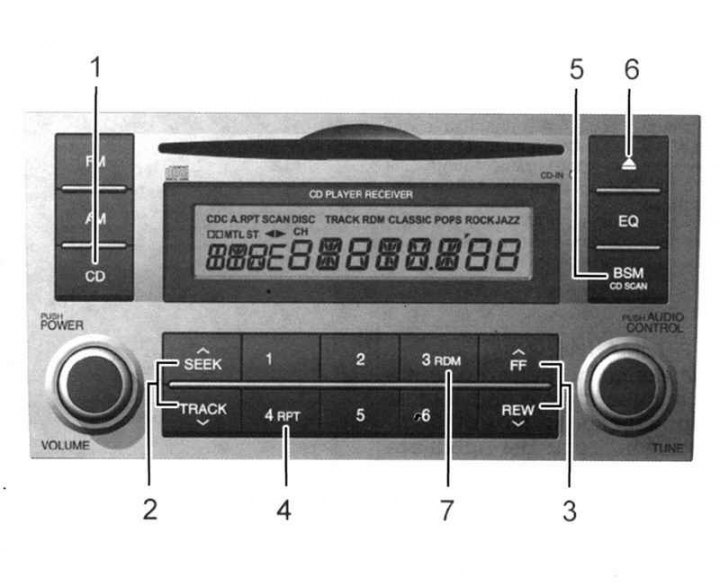
Fig. 1.108. Disc player (M445): 1 – CD player mode selection button; 2 – button to go to the beginning of the recording ("track"); 3 – button to go to the beginning/end of the CD; 4 – replay button; 5 – button to search for the desired record ("track"); 6 – CD eject button; 7 – button to select CD tracks in random order
CD Player Mode Select Button
Insert a disc to start playing it while listening to the radio.
If there is a disc in the drive, pressing the CD button will start the CD player even while listening to the radio.
For the CD player to operate, the ignition key must be in the "ON" or "ACC" position.
To play a CD, press the CD button without pressing the POWER ON-OFF button.
Note: Do not put any labels on the CD as this may damage the CD player.
The CD player will not be able to read information from CD-R and CD-RW discs unless they are finalized after recording. For more information, refer to the description of your CD-R/CD-RW writer or CD-R/CDRW software.
Depending on the recording condition, some CD-R and CD-RW discs may not play on this CD player.
Button to go to the beginning of the recording ("track")
Using the track number, you can select the desired track on the CD being played.
Click on the button
 once to jump to the beginning of the next entry. Click the button
  once to go to the beginning of the current entry.
Button to go to the beginning/end of the CD
If you want to go to the beginning or end of the CD, press and hold the (FF) or (REW) button. If you release the button, the CD player will continue playing.
"RPT" (repeat play button)
To listen to the current track again, press the RPT button. To cancel, press the button again.
If you do not release the RPT button before the track has finished playing, the music track will automatically repeat.
This process will continue until the button is pressed again or the radio is turned off and on again.
"CD SCAN" (button for searching for the desired record)
To play the first 10 tracks of each track, press the "CD SCAN" button.
Press and hold the button for less than 10 seconds when the desired "track" is found.
CD eject button
To eject a CD from the player, press the button
 . If the CD is damaged, you can eject it by pressing and holding the button for 3 seconds or more. Use this method only if you cannot eject the CD in the normal way.
"RANDOM" (button for selecting CD tracks in random order)
To listen to the tracks in random order, press the RDM button (you will hear a beep). To cancel this function, press the RDM button again.
Note: To ensure smooth operation of the audio system, ensure normal temperature in the cabin using the air conditioning system or heating system.
Note: When replacing the audio fuse, use a fuse of the correct rating.
Note: When the battery is disconnected, all installed tags will be deleted and will need to be reinstalled.
Note: The equipment is designed for 12 volts DC voltage only (battery negative ground).
Note: The audio system mechanism is a precise and complex device. Do not attempt to disassemble it or adjust any part yourself.
Note: Adjust the volume of the audio system to a level where external sounds can be heard.
Note: Keep the audio system (including speakers) away from water or moisture.