


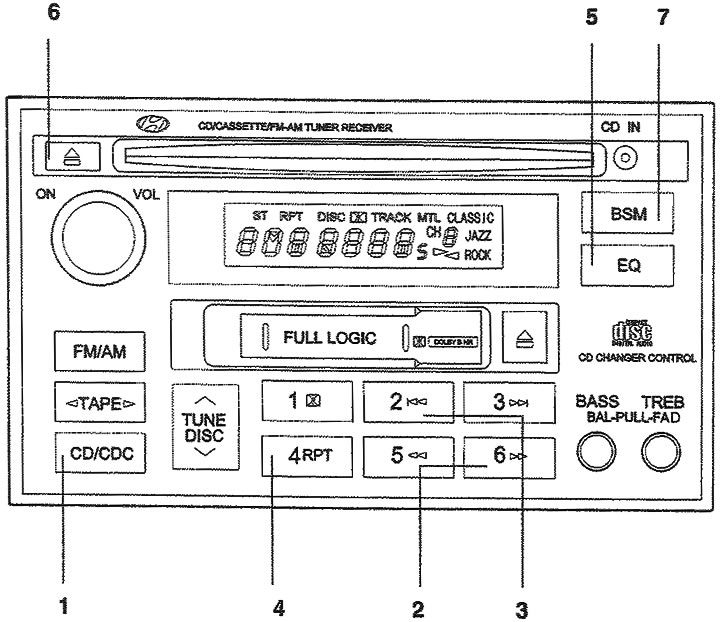
1. CD player mode selection button; 2. Buttons for jumping to the beginning / to the end of the CD; 3. Go to the beginning of the recording ("track"); 4. Replay button; 5. Tone correction button; 6. CD eject button; 7. Search button for the desired record (additional equipment).
1. CD/CDC (Compact Disc Player Mode Selection Button).
- Insert the CD with the label facing up.
- To start playing a CD while the stereo is playing or to listen to a tape, insert a CD.
- If there is a CD inside, even if the stereo receiver or radio is on, pressing this button will start playing the CD.
- The CD player operates when the ignition key is in the "ON" or "ACC" position.
2. ►►/◄◄ (Buttons for jumping to the beginning / to the end of the CD). If you want to go to the beginning or end of the CD, press and hold (FF) ►►. (REW) ◄◄ When you release the button, the CD player will resume playback.
3. Go to the beginning of the recording ("track").
- Using the track number, you can select the desired track on the CD being played.
- Press the |◄◄ button once to go to the beginning of the next record. Press the |◄◄ button once to go to the beginning of the current record.
4. RPT Button (Repeat Play Button).
- You can listen to the same recording again by pressing the RPT repeat button. To cancel, press the button again.
- If you do not disable this function, then after the recording is finished, its playback will be started again automatically. This process will be repeated until you press this button again.
5. EQ (Tone correction button). To obtain the desired sound quality, press this button to select CLASSIC, JAZZ, ROCK and DEFEAT mode.
6. CD eject button. Pressing the button ▲, when the CD is in the CD player will cause the CD to be ejected.
7. SCAN (Button for searching the desired record ("track")) (additional equipment).
- Pressing this button will play the first 10 seconds of each recording ("track").
- When the melody you want is playing, press the SCAN button again for 10 seconds, and then the recording you have selected will sound in full and from the very beginning.
Note:
- To ensure proper operation of the audio equipment, maintain normal air temperature in the vehicle using the air conditioning and heating systems of the vehicle.
- When replacing a fuse, replace it with a new one with the same rated current value.
- When disconnecting the wires from the battery terminals, all memorized station frequencies are erased. In this case, you need to set them again.
- Do not apply lubricant to any rotating parts. Do not allow the laser head or CD player mechanism to come into contact with magnets, screwdrivers or other metal objects.
- This equipment is designed for use only with a battery rated at 12VDC and negative ground.
- This is precision electrical equipment. Do not attempt to disassemble or adjust it.
- While driving, set the volume of the audio equipment so that you can hear outside sounds.
- Do not expose this equipment (including speakers and tapes) to extreme humidity or water.
(Material was obtained from an official resource: HYUNDAIBOOK)