


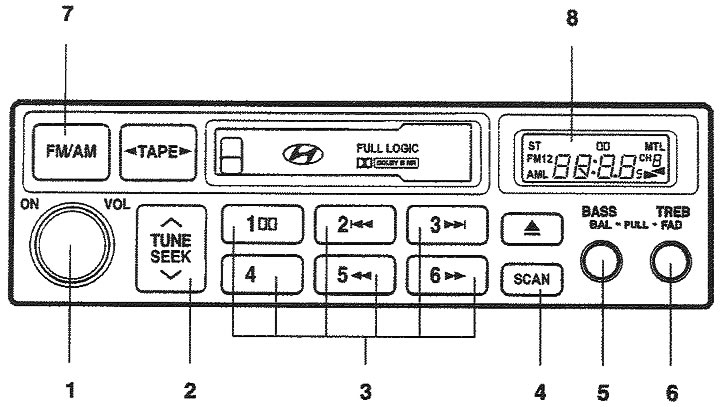
1. Power switch, Volume control knob; 2. Frequency setting button; 3. Station memory buttons; 4. Automatic tuning button for received stations; 5. Bass tone control knob / Left/right stereo balance control knob; 6. Treble tone control knob / Front/rear stereo balance control knob; 7. Range selection button; 8. Liquid crystal display.
1. ON/VOL (Power switch, volume control knob). The radio operates when the ignition key is in the "ON" or "ACC" (Accessory) position. Press the button to turn on the power. To increase the volume, rotate the knob clockwise, and to decrease the volume, rotate it counterclockwise. To turn off the radio, press the button again.
2. TUNE (Manual frequency tuning button). Press the a or v sides of this button for no more than 0.5 seconds to increase or decrease the frequency. When you hold the button down for 0.5 seconds or longer, the buzzer sounds and the channel selection continues. If you release the button after the buzzer sounds, the automatic frequency tuning function will be activated,
SEEK (Automatic frequency tuning). When you press the △ side for more than 0.5 seconds, the buzzer will sound and the radio will automatically tune to the next station with a higher broadcast frequency, and when you press the ▽ side for more than 0.5 seconds, the buzzer will sound and the radio will automatically tune to the next station with a lower broadcast frequency. If the selected broadcast station is already stored in memory, the number of the channel assigned to it will also appear on the display.
3. Station memory buttons (1-6). To listen to a radio station whose frequency is stored in memory, press these buttons for no more than two seconds. When you press the button for more than two seconds, the radio station to which the radio receiver was tuned is entered into memory.
4. SCAN (Automatic tuning button for received stations). When you press this button, the frequency will increase and the receiver will tune in 5 seconds to the received stations one by one. To stop automatic tuning, press this button again.
5. BASS/BAL (Bass tone control knob / Left/right stereo balance control) Push the knob to pull it out. Turn the knob clockwise to increase the bass tone, and turn the knob counterclockwise to decrease the bass tone. Pull the knob out to the next fixed position. Turn it clockwise to increase the volume of the right speaker. (The volume of the left speaker will decrease). Turning the knob counterclockwise will increase the volume of the left speaker. (The volume of the right speaker will decrease.).
6. TREB/FAD (Treble tone control knob / Front/Rear stereo balance control knob) Push the knob to pull it out. Turn it left or right to set the desired treble tone. Pull the knob out to the next fixed position, Turn the knob counterclockwise to increase the volume of the front speakers. (The volume of the rear speakers will decrease). Turning the knob clockwise will increase the volume of the rear speakers. (The volume of the front speakers will decrease.).
7. FM/AM (Band selection button). Pressing this button switches the FM/AM ranges in the following sequence:
FM1 → FM2 → AM → FM1 (FM1 → FM2 → M → L → FM1: for Europe)
8. Liquid crystal display. The following information is displayed on the liquid crystal display; fM1/FM2/AM/(L)/(M) broadcast frequency, selected station number, ST stereo reception indicator for FM broadcast stations.