


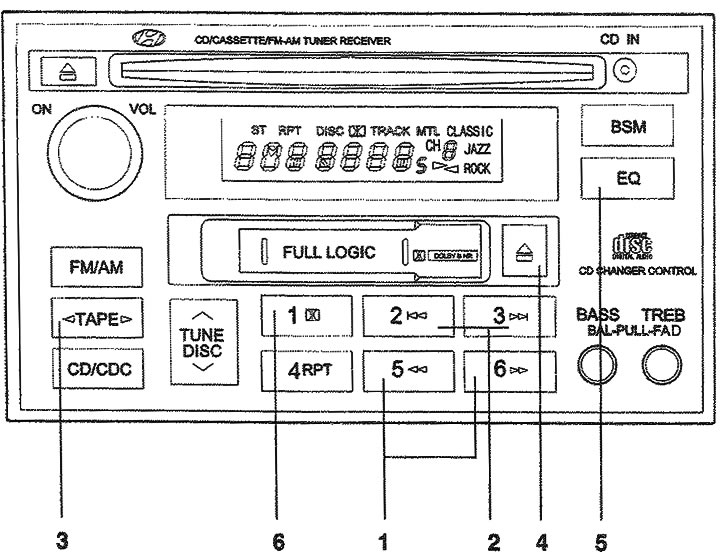
1. Fast forward/rewind buttons; 2. Buttons for going to the beginning of the recording; 3. Button for changing the direction of the tape movement; 4. Cassette eject button; 5. Tone correction button; 6. Dolby noise reduction system button.
1. Fast forward/rewind buttons for the tape.
- Fast forward (FF) of the tape starts when you press the ►►| button during audio playback (PLAY) or fast rewind (REW) of the tape.
- Pressing the ◄◄ button again while fast forwarding the tape (FF) will start playback of the audio recording.
- Fast rewinding of the tape (REW) starts when you press the ►►| button during audio playback (PLAY) or fast forwarding of the tape (FF).
- Pressing the ◄◄ button again while fast rewinding the tape (REW) will start playback of the audio recording.
2. Buttons for going to the beginning of the recording. To search for the beginning of each song recorded on the tape, press this button. The distance between recordings must be at least 4 seconds for this function to work.
- Pressing the |◄◄ button will move to the beginning of the next recording.
- Pressing the |◄◄ button will take you to the beginning of the current recording.
3. TARE PROGRAM Button. (Button for changing the direction of the belt movement) Pressing this button changes the direction of the belt movement, and the indicator of the direction of the belt movement will appear.
4. EJECT Button (Cassette eject button).
The article is copied from this website hyundaibook
- When the button is pressed ▲ the cassette is ejected if it is inside the radio.
- When you press the button ▲ during fast forward/rewind of the tape, the cassette is ejected.
5. EQ Button (Tone Correction Button). To obtain the desired sound quality, press this button to select CLASSIC, JAZZ, ROCK and DEFEAT mode.
6. DOLBY Button (Dolby Noise Reduction Button) If there is constant noise in the background during playback, you can suppress it by simply pressing this button. If you want to turn off this function, press this button again.