


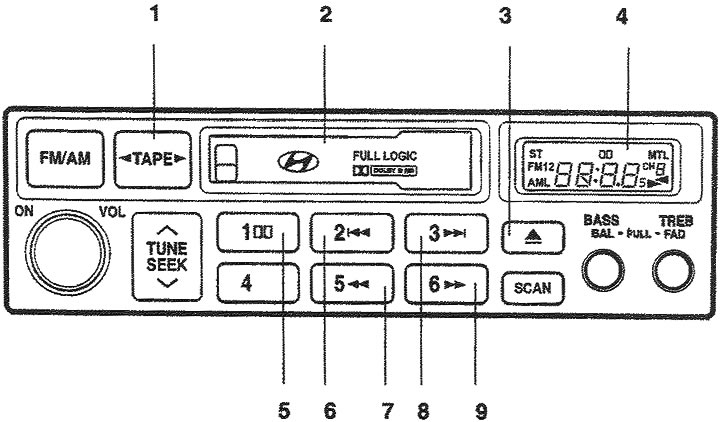
1. Button for selecting the cassette listening mode and changing the direction of tape movement; 2. Cassette slot; 3. Cassette eject button; 4. Liquid crystal display; 5. Dolby Noise Reduction System Button; 6. Button to go to the beginning of the recording; 7. Fast rewind button; 8. Button to go to the end of the recording; 9. Fast forward button for the tape.
1. Button for selecting the cassette listening mode and changing the direction of tape movement. When a cassette is in the slot, press this button to listen to it. In the cassette listening mode, pressing this button changes the direction of the tape.
2. Cassette slot. Insert the cassette into the slot so that the side with the magnetic tape is on the right. The radio will automatically take the cassette and start playing even if the power supply to the radio has been disconnected and if the ignition key is in the "ON" or "ACC" ("Accessory Equipment") position.
3. Cassette eject button (▲). To eject the cassette, press this button. The cassette can be ejected even when the ignition key is in the "OFF" position.
4. Liquid crystal display. The LCD display shows the status of the cassette being listened to. It informs the driver about the cassette being listened to, the direction of the tape, fast forward and rewind, the use of MTL metallized tape and the operation of the Dolby noise reduction system.
5. DOLBY Button (Dolby noise reduction system button). When listening to a recording recorded in the Dolby noise reduction system, press this button to suppress extraneous noise. The icon (
 ). When you press this button again, the icon () will disappear.
6. Button to go to the beginning of the recording (|◄◄).
To search for the beginning of each song recorded on the tape, press this button. The "REW" indicator will flash on the display. To stop rewinding, press this button again and the recording will start playing.
7. Fast rewind button (◄◄). Fast rewinding of the tape to the beginning begins when the ◄◄ button is pressed; the indicator ("REW") appears on the display. When the ◄◄ button is pressed again during fast rewinding ("REW") of the tape, the audio recording will begin playing.
8. Button to go to the end of the recording (►►|). To fast forward to the end of the song and search for the beginning of each song recorded on the tape, press this button. The "FF" indicator will flash on the display. To stop rewinding, press this button again and the recording will start playing.
9. Fast forward button (►►). Fast forwarding of the tape to the end begins when the ►► button is pressed; the ("FF") indicator appears on the display. When the ►► button is pressed again during fast forwarding of the tape ("FF"), the audio recording will begin playing.