


Proper handling of compact discs
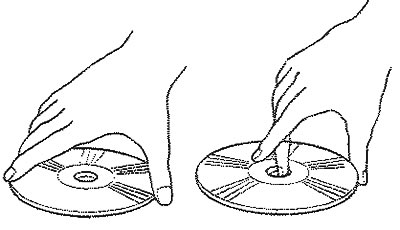
Hold the disc in your hands as shown in the figure. Do not allow the CD to fall. Never touch the working surface of the disc with your fingers. If the working surface of the CD is scratched, it may cause skipping of tracks. Do not write anything with a ballpoint pen, felt-tip pen, pencil, etc. on the surface of the disc sticker, and do not attach any other stickers, signs, etc.
Damaged CD
Do not use a cracked or warped disc. Using such a disc may cause the CD player to malfunction.
Storage
When storing CDs, be sure to store each CD in its own packaging. Never place CDs in direct sunlight or in places with high temperatures or humidity.
Do not attempt to squeeze or eject the CD with your hands while the CD loading mechanism is operating.
Material was obtained from an official resource: HyundaiBook
Do not attempt to remove the CD player immediately after a CD has been loaded or the CD eject button has been pressed. If you remove the CD player before the disc loading operation is complete, it may be damaged.
Do not attempt to insert a CD into the CD player when it is removed or not receiving power.
Keep your CDs clean
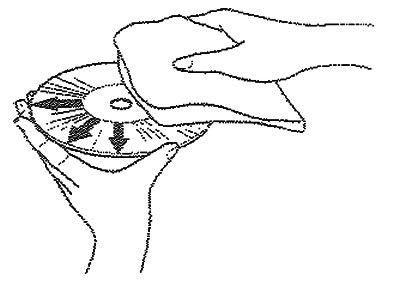
Fingerprints, dust or dirt on the CD may cause skipping. To clean the disc, use a soft, clean, dry cloth. A heavily soiled, greasy disc can be cleaned with a soft cloth moistened with a mild neutral cleaner. See the illustration.