


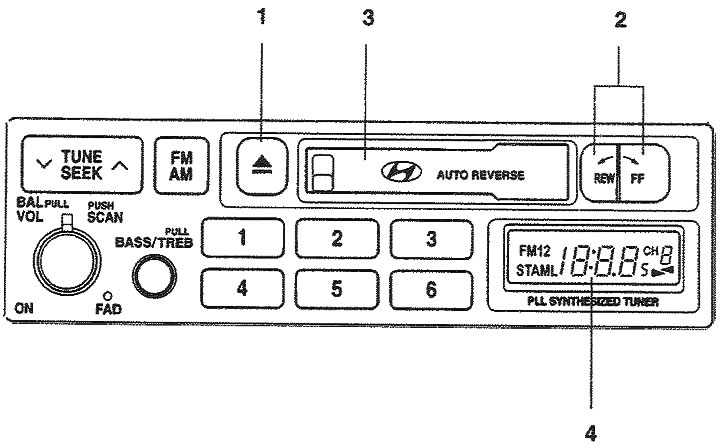
1. Cassette eject button; 2. Fast forward/rewind buttons; 3. Cassette slot; 4. Liquid crystal display.
1. Cassette eject button (▲). To eject the cassette, press this button.
2. Cassette slot. Insert the cassette into the slot with the tape side facing right.
3. FF/REW (Fast forward/rewind buttons, tape direction change buttons) Pressing the (FF) button starts fast forwarding the tape. Pressing the (REW) button starts fast rewinding the tape.
When listening to a cassette, pressing the (FF) and (REW) buttons simultaneously switches to listening to the reverse side of the cassette.
4. Liquid crystal display. The LCD display shows the direction of tape movement (► or ◄) of the cassette being played.