
HyundaiBook.ru
Repair Chevrolet Repair Honda Repair Toyota Repair Land Rover Repair VAZ Repair Renault Repair Nissan
English Русский
Български
Беларускі
Український
Српски
Hrvatski
Română
Polski
Slovenský
Magyar
ArticlesSitemapContacts  


  Accent   Elantra   Getz   Grandeur   Sonata   Santa Fe   Tucson   Others
Elantra 1 (1990-1995, petrol) Elantra 2 (1995-2000, petrol) Elantra 3 (2000-2006)
  • Main
  • Elantra
  • XD (2000-2006)
  • User manual
  • Audio system
  • Stereo Receiver Operation (H260)

Stereo Receiver Operation (H260) (Hyundai Elantra XD)

0
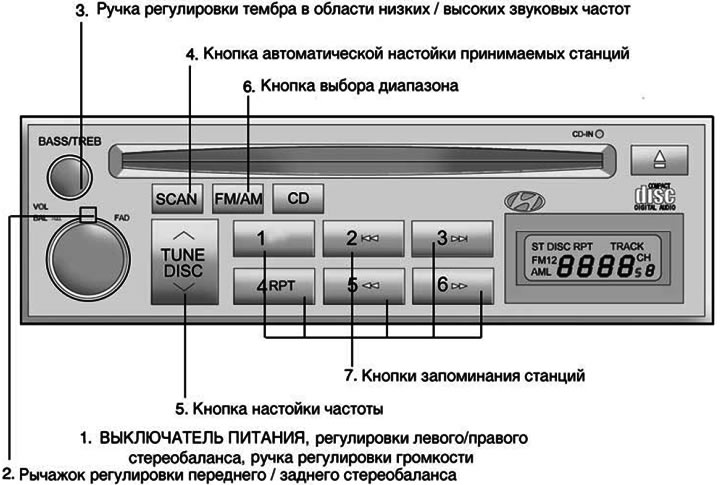
1. POWER ON-OFF (Power switch)


1. POWER ON-OFF (Power switch)


The radio operates when the ignition key is in the "ON" or "ACC" position. Press the button to turn on the power. In radio reception mode, the LCD will show the frequency of the radio station being received, and in CD playback mode, the recording ("track") indicator will be shown. To turn off the radio power, press the button again.

VOL (Volume control knob)


To increase the volume, rotate the knob clockwise, and to decrease the volume, rotate it counterclockwise.

BAL (Left/Right Stereo Balance Adjustment)


Pull the knob and turn it clockwise to increase the volume of the right speaker. (The volume of the left speaker will decrease). Turning the knob counterclockwise will increase the volume of the left speaker. (The volume of the right speaker will decrease).

2. FAD (Front/Rear Stereo Balance Adjustment Lever)


Turn the lever counterclockwise to increase the volume of the front speakers. (The volume of the rear speakers will decrease). Turning the lever clockwise will increase the volume of the rear speakers. (The volume of the front speakers will decrease).

3. BASS (Low frequency tone control knob)


Push the knob to push it outwards, and turn it left or right to set the desired timbre in the low-frequency range.


TREB (High frequency tone control knob)


Pull the extended handle outward to the next locked position.

Turn it left or right to set the desired tone in the high frequency range.

4. SCAN (Automatic tuning button for received stations)


When you press this button, the frequency will increase and the receiver will tune in to the received stations one by one for 5 seconds. To stop, press this button again.

5. TUNE (Manual frequency setting button)


Press the (△) or (▽) sides of this button to increase or decrease the frequency.

If the button is held down for 0.5 seconds or longer, the stop signal is skipped (broadcast station waves) and the selection of channels continues.

Automatic frequency tuning


Press and hold the TUNE button for 1 second or longer, when you release it, the receiver will automatically tune in to the next possible station with a beep. When you press the (L) side, the radio will automatically tune to the next station with a higher broadcast frequency, and when you press the (v) side, the radio will automatically tune to the next station with a lower broadcast frequency.

6. FM/AM (Range selection button)


Pressing the FM/AM| button switches between AM, FM1 and FM2 bands. The selected band is displayed on the LCD display.

7. Station memory buttons


You can store six (6) stations in each of the AM, FM1 and FM2 bands into the memory of this radio.

Storing station frequencies


You can store 6 AM stations and 12 FM stations in the audio system's memory. You can then select one of these stations by simply pressing the band selection button and/or one of the six station memory buttons. To store these stations in memory, follow these steps:


  • Press the band selection button to select one of the AM, FM1 or FM2 bands.
  • Select the station you want to store in memory using manual or automatic tuning.
  • Select the station memory button to which you want to assign this station.
  • Press and hold this station memory button for two seconds or more. The display will show an indicator with the number of the station memory button you have selected. After the frequency is stored in memory, its value will flash on the display. You must release the button and you can continue memorizing the next desired station. You can program a total of 18 stations, assigning one AM station and two FM stations to one button.
  • Once programming is complete, you can turn on any of the programmed stations by selecting any of the AM, FM1 or FM2 bands and pressing the corresponding station frequency memory button.
This article is available at russian, bulgarian, belarusian, ukrainian, serbian, croatian, romanian, polish, slovak, hungarian
This article has been reviewed by: Konstantin Smirnov
Add to social network:

Previous
Elantra 3: Audio system
Next

Radio operation (H240)
Stereo Radio Operation (H240)
Stereo Receiver Operation (H210)
Description of the operation of the radio receiver
Operation of the CD player (H260)
Car CD Changer (H260)
Stereo radio operation (H280)/(H290)
Radio operation (H280)/(H290)
CD Player (H280)/(H290)
We recommend other articles on the topic of Hyundai manuals:

Checking the operation of the fuel pump Hyundai Accent 1 (1994-1999)
Stereo receiver operation (K210, K220) Hyundai Getz (2002-2011)
Single Cam Engine — Receiver and Intake Manifold — Removal and… Hyundai Sonata 3 (1993-1998)
Stereo receiver operation (M455) Hyundai Santa Fe 2 (2007-2012, petrol)
Checking the operation of the brake booster Hyundai Tucson 1 (2005-2010)
Stereo receiver operation (H210) Hyundai Matrix (2001-2010, petrol)

Link in different formats to this article

Visitor comments
No comments yet


How much will 13 + 25 ?


Elantra 3 (2000-2006) 
  • User manual
  • Control devices
  • Audio system
  • Starting the engine and driving
  • Faults en route
  • Maintenance and care
  • Technical information
  • Power unit
  • Gasoline engines
  • Diesel engines
  • Lubrication system
  • Cooling system
  • Fuel system (gasoline)
  • Fuel system (diesel)
  • Decreased toxicity
  • Ignition system
  • Transmission
  • Clutch
  • Mechanical gearbox
  • Automatic gearbox
  • Drive shafts and axles
  • Chassis
  • Car suspension
  • Steering
  • Brake system
  • Body
  • Exterior (external elements)
  • Interior (internal elements)
  • Air conditioning system
  • Electrical equipment
  • Equipment and devices
  • Headlights and lighting
  • Power devices
  • Electrical circuits
Elantra 2 (1995-2000, petrol) 
  • General information
  • Maintenance
  • Power unit
  • Engine repair
  • Cooling system
  • Intake and exhaust system
  • Fuel system
  • Transmission
  • Clutch
  • Manual gearbox
  • Automatic gearbox
  • Drive shafts and axles
  • Chassis
  • Front suspension
  • Rear suspension
  • Steering
  • Brake system
  • Body
  • Body elements
  • Electrical equipment
  • Equipment and devices
  • Electrical diagrams
Elantra 1 (1990-1995, petrol) 
  • General information
  • Introduction to the guide
  • Maintenance
  • Power unit
  • Minor engine repair
  • Engine overhaul
  • Lubrication system
  • Cooling system
  • Fuel injection system
  • Ignition system
  • Exhaust system
  • Transmission
  • Clutch
  • Manual gearbox
  • Automatic gearbox
  • Drive shafts
  • Chassis
  • Front suspension
  • Rear suspension
  • Steering
  • Wheels and tires
  • Troubleshooting
  • Brake system
  • Body
  • Body elements
  • Electrical equipment
  • Equipment and devices
  • Power devices
  • Heating and air conditioning
  • Electrical circuits
HyundaiBook.ru © 2018-2026 · Mobile version · Sitemap: EN BG BY UA RS HR RO PL SK HU · Administration · Site search · Hyundai owners Accent 1 · Accent 2 · Accent 3 · Elantra 1 · Elantra 2 · Elantra 3 · Getz · Sonata 3 · Sonata 4 · Santa Fe 2 · Tucson 1 · Tucson 2 · Matrix ·
This site uses cookies to optimize its functionality. By continuing, you agree to our terms.