
HyundaiBook.ru
Repair Chevrolet Repair Honda Repair Toyota Repair Land Rover Repair VAZ Repair Renault Repair Nissan
English Русский
Български
Беларускі
Український
Српски
Hrvatski
Română
Polski
Slovenský
Magyar
ArticlesSitemapContacts  


  Accent   Elantra   Getz   Grandeur   Sonata   Santa Fe   Tucson   Others
Elantra 1 (1990-1995, petrol) Elantra 2 (1995-2000, petrol) Elantra 3 (2000-2006)
  • Main
  • Elantra
  • XD (2000-2006)
  • User manual
  • Audio system
  • CD Player (H280)/(H290)

CD Player (H280)/(H290) (Hyundai Elantra XD)

0
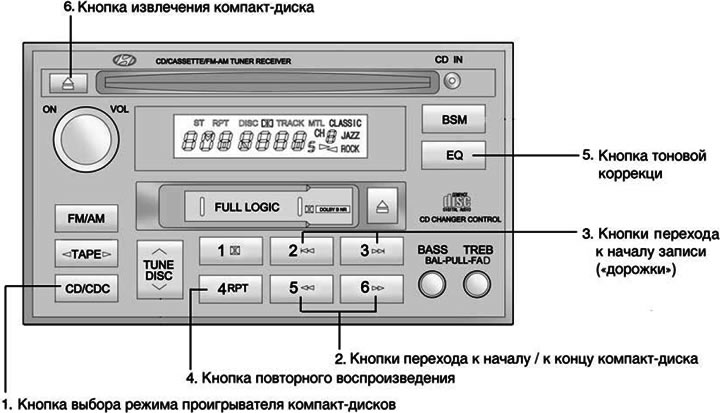
1. CD/CDC (CD Player Mode Select Button)


1. CD/CDC (CD Player Mode Select Button)


Insert the CD with the label facing up.

To start playing a CD while the stereo is playing or to listen to a tape, insert a CD.

When there is a CD inside, even if the stereo or radio is on, pressing this button will start playing the CD. The CD player operates when the ignition switch is in the "ON" or "ACC" position.

2. ►►/◄◄ (Buttons to go to the beginning / end of the CD)


If you want to go to the beginning or end of the CD, press and hold the ►► (FF) or ◄◄ (REW) button.

When you release the button, the CD player will resume playback.

3. Buttons for going to the beginning of the recording ("track")


Using the record number ("tracks"), you can select the desired record on the CD being played.

Press the ►►| button once to skip to the beginning of the next entry. Press the |◄◄ button once to go to the beginning of the current entry.

4. RPT (Replay button)


You can listen to the same recording again by pressing the RPT repeat button. To cancel, press the button again.

If you do not disable this function, after the recording is finished, its playback will start again automatically. This process will repeat until you click this button again.


5. EQ (Tone Correction Button)


To obtain the desired sound quality, press this button to select CLASSIC, JAZZ, ROCK and DEFEAT mode.

6. CD eject button

6. CD eject button


Pressing the button , when the CD is in the CD player will cause the CD to be ejected.

7. SCAN (Button for searching the desired record ("track"))


Pressing this button will play the first 10 seconds of each recording ("track").

When the melody you want is playing, press the SCAN button again for 10 seconds, and then the recording you have selected will sound in full and from the very beginning.

Note:
  • To ensure proper operation of the audio equipment, maintain normal air temperature in the vehicle using the air conditioning and heating systems of the vehicle.
  • When replacing a fuse, replace it with a fuse of the same rated current.
  • When you disconnect the wires from the battery terminals, all stored station frequencies are erased. In this case, you need to install them again.
  • Do not add lubricant to any rotating parts.
  • This equipment is designed for use only with a battery rated at 12VDC and negative ground.
  • This is high-precision electrical equipment. Do not attempt to disassemble or adjust it.
  • While driving, set the volume of the audio equipment so that you can hear outside sounds.
  • Do not expose audio equipment to extreme humidity or water.
This article is available at russian, bulgarian, belarusian, ukrainian, serbian, croatian, romanian, polish, slovak, hungarian
This article has been reviewed by: Konstantin Smirnov
Add to social network:

Previous
Elantra 3: Audio system
Next

Radio operation (H280)/(H290)
Stereo radio operation (H280)/(H290)
Car CD Changer (H260)
Operation of the CD player (H260)
Stereo Receiver Operation (H260)
CD changer (H280)/(H290)
Audio System Error Codes
Caring for compact discs
Caring for tape cassettes
Radio Antenna Maintenance
We recommend other articles on the topic of Hyundai manuals:

Operation of the CD player (H280) Hyundai Getz (2002-2011)
Operation of the CD player (M445) Hyundai Santa Fe 2 (2007-2012, petrol)
Stereo receiver operation (H280) Hyundai Matrix (2001-2010, petrol)

Link in different formats to this article

Visitor comments
No comments yet


How much will 10 + 32 ?


Elantra 3 (2000-2006) 
  • User manual
  • Control devices
  • Audio system
  • Starting the engine and driving
  • Faults en route
  • Maintenance and care
  • Technical information
  • Power unit
  • Gasoline engines
  • Diesel engines
  • Lubrication system
  • Cooling system
  • Fuel system (gasoline)
  • Fuel system (diesel)
  • Decreased toxicity
  • Ignition system
  • Transmission
  • Clutch
  • Mechanical gearbox
  • Automatic gearbox
  • Drive shafts and axles
  • Chassis
  • Car suspension
  • Steering
  • Brake system
  • Body
  • Exterior (external elements)
  • Interior (internal elements)
  • Air conditioning system
  • Electrical equipment
  • Equipment and devices
  • Headlights and lighting
  • Power devices
  • Electrical circuits
Elantra 2 (1995-2000, petrol) 
  • General information
  • Maintenance
  • Power unit
  • Engine repair
  • Cooling system
  • Intake and exhaust system
  • Fuel system
  • Transmission
  • Clutch
  • Manual gearbox
  • Automatic gearbox
  • Drive shafts and axles
  • Chassis
  • Front suspension
  • Rear suspension
  • Steering
  • Brake system
  • Body
  • Body elements
  • Electrical equipment
  • Equipment and devices
  • Electrical diagrams
Elantra 1 (1990-1995, petrol) 
  • General information
  • Introduction to the guide
  • Maintenance
  • Power unit
  • Minor engine repair
  • Engine overhaul
  • Lubrication system
  • Cooling system
  • Fuel injection system
  • Ignition system
  • Exhaust system
  • Transmission
  • Clutch
  • Manual gearbox
  • Automatic gearbox
  • Drive shafts
  • Chassis
  • Front suspension
  • Rear suspension
  • Steering
  • Wheels and tires
  • Troubleshooting
  • Brake system
  • Body
  • Body elements
  • Electrical equipment
  • Equipment and devices
  • Power devices
  • Heating and air conditioning
  • Electrical circuits
HyundaiBook.ru © 2018-2026 · Mobile version · Sitemap: EN BG BY UA RS HR RO PL SK HU · Administration · Site search · Hyundai owners Accent 1 · Accent 2 · Accent 3 · Elantra 1 · Elantra 2 · Elantra 3 · Getz · Sonata 3 · Sonata 4 · Santa Fe 2 · Tucson 1 · Tucson 2 · Matrix ·
This site uses cookies to optimize its functionality. By continuing, you agree to our terms.