
HyundaiBook.ru
Repair Chevrolet Repair Honda Repair Toyota Repair Land Rover Repair VAZ Repair Renault Repair Nissan
English Русский
Български
Беларускі
Український
Српски
Hrvatski
Română
Polski
Slovenský
Magyar
ArticlesSitemapContacts  


  Accent   Elantra   Getz   Grandeur   Sonata   Santa Fe   Tucson   Others
Elantra 1 (1990-1995, petrol) Elantra 2 (1995-2000, petrol) Elantra 3 (2000-2006)
  • Main
  • Elantra
  • XD (2000-2006)
  • Electrical equipment
  • Equipment and devices
  • Radio receiver — removal and installation

Radio receiver — removal and installation (Hyundai Elantra XD)

0
Contents: Removal and installation ⇓ Cleaning the head and the main shaft…⇓ Front speakers ⇓ Rear speakers ⇓ High frequency speaker ⇓ Checking the speaker ⇓

Removal and installation


1. Disconnect the cable from the negative terminal of the battery.
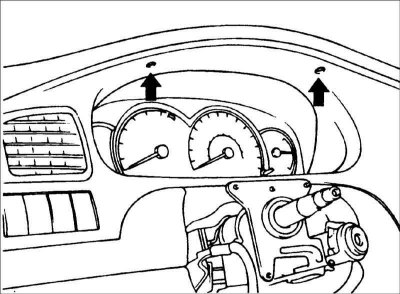
2. Remove the instrument cluster…


2. Remove the instrument cluster mounting screws.
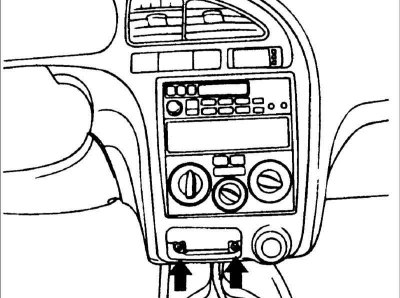
3. Remove the ashtray, then unscrew the…


3. Remove the ashtray, then unscrew the instrument cluster mounting screws and remove it.
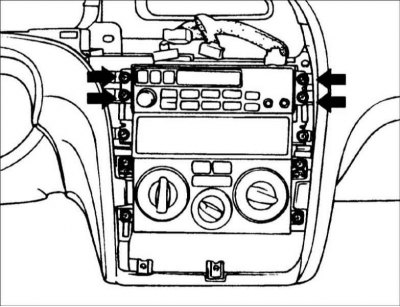
4. Remove the instrument cluster and…


4. Remove the instrument cluster and disconnect the connectors from the instrument cluster.


5. Remove the radio.

6. Installation is carried out in the reverse order of removal.

Cleaning the head and the main shaft of the tape recorder


(The text is provided by the web resource: www.HyundaiBook.ru)

1. To ensure optimum performance of the tape recorder, clean the head and capstan as necessary. The frequency of cleaning depends on the frequency of use of the tape recorder and the cleanliness of the tape.
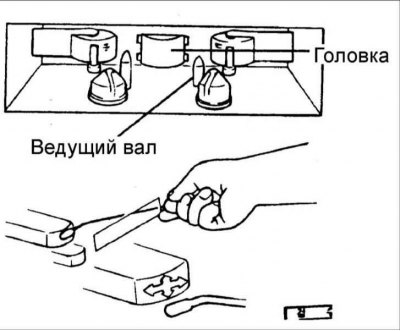
2. Use a cotton swab soaked in alcohol…


2. Use a cotton swab soaked in alcohol to clean the head and drive shaft. Wipe the head and shaft.

Front speakers
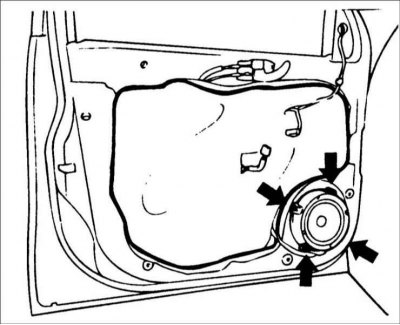


1. Remove the front door trim, unscrew…


1. Remove the front door trim, unscrew the screws and remove the speaker.

2. Installation is carried out in the reverse order of removal.

Rear speakers


1. Remove the rear seat.
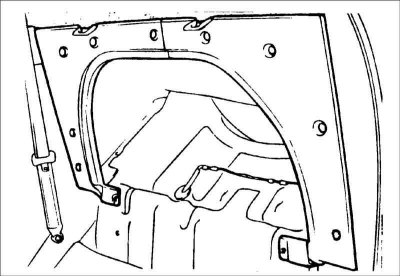
2. After removing the clips, remove the…


2. After removing the clips, remove the separate upholstery.
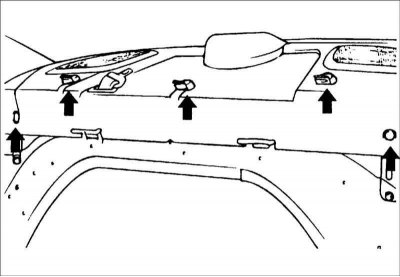


3. Remove the bolts and fasteners…


3. Remove the bolts and fasteners holding the rear shelf.
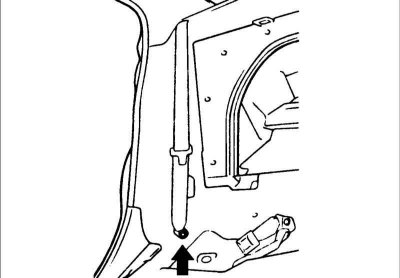
4. Remove the rear seat belt lower…


4. Remove the rear seat belt lower mounting bolt.

5. Remove the rear shelf.
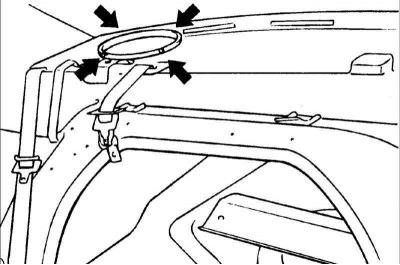

5. Remove the rear shelf.

6. Remove the screws and remove the…


6. Remove the screws and remove the speaker.


7. Installation is carried out in the reverse order of removal.

High frequency speaker
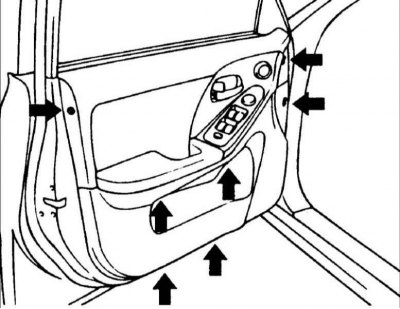


1. Remove the front door trim.
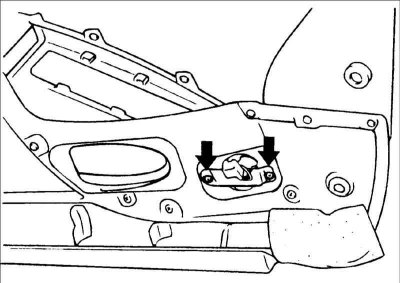

1. Remove the front door trim.

2. Disconnect the connector and remove…


2. Disconnect the connector and remove the tweeter.

3. Installation is carried out in the reverse order of removal.

Checking the speaker


1. Use an ohmmeter to check the…


1. Use an ohmmeter to check the resistance of the speaker voice coil.

2. If the speaker makes a clicking sound when you connect the ohmmeter, it is working properly.
This article is available at russian, bulgarian, belarusian, ukrainian, serbian, croatian, romanian, polish, slovak, hungarian
This article has been reviewed by: Konstantin Smirnov
Add to social network:

Previous
Elantra 3: Equipment and devices
Next

Rear window wiper
Windscreen wiper and washer
Parking brake position switch
Instrument cluster
Sound signal
Rear window defroster
Airbags (SRS)
Seat belts
Troubleshooting electrical equipment
Basic data for adjustments and control
We recommend other articles on the topic of Hyundai manuals:

Radio receiver antenna Hyundai Accent 2 (1999-2005)
How does a car radio work Hyundai Getz (2002-2011)
Single Cam Engine — Receiver and Intake Manifold — Removal and… Hyundai Sonata 3 (1993-1998)
Operation of the radio receiver (M445) Hyundai Santa Fe 2 (2007-2012, petrol)
Stereo receiver operation (H210) Hyundai Matrix (2001-2010, petrol)

Link in different formats to this article

Visitor comments
No comments yet


How much will 30 + 22 ?


Elantra 3 (2000-2006) 
  • User manual
  • Control devices
  • Audio system
  • Starting the engine and driving
  • Faults en route
  • Maintenance and care
  • Technical information
  • Power unit
  • Gasoline engines
  • Diesel engines
  • Lubrication system
  • Cooling system
  • Fuel system (gasoline)
  • Fuel system (diesel)
  • Decreased toxicity
  • Ignition system
  • Transmission
  • Clutch
  • Mechanical gearbox
  • Automatic gearbox
  • Drive shafts and axles
  • Chassis
  • Car suspension
  • Steering
  • Brake system
  • Body
  • Exterior (external elements)
  • Interior (internal elements)
  • Air conditioning system
  • Electrical equipment
  • Equipment and devices
  • Headlights and lighting
  • Power devices
  • Electrical circuits
Elantra 2 (1995-2000, petrol) 
  • General information
  • Maintenance
  • Power unit
  • Engine repair
  • Cooling system
  • Intake and exhaust system
  • Fuel system
  • Transmission
  • Clutch
  • Manual gearbox
  • Automatic gearbox
  • Drive shafts and axles
  • Chassis
  • Front suspension
  • Rear suspension
  • Steering
  • Brake system
  • Body
  • Body elements
  • Electrical equipment
  • Equipment and devices
  • Electrical diagrams
Elantra 1 (1990-1995, petrol) 
  • General information
  • Introduction to the guide
  • Maintenance
  • Power unit
  • Minor engine repair
  • Engine overhaul
  • Lubrication system
  • Cooling system
  • Fuel injection system
  • Ignition system
  • Exhaust system
  • Transmission
  • Clutch
  • Manual gearbox
  • Automatic gearbox
  • Drive shafts
  • Chassis
  • Front suspension
  • Rear suspension
  • Steering
  • Wheels and tires
  • Troubleshooting
  • Brake system
  • Body
  • Body elements
  • Electrical equipment
  • Equipment and devices
  • Power devices
  • Heating and air conditioning
  • Electrical circuits
HyundaiBook.ru © 2018-2026 · Mobile version · Sitemap: EN BG BY UA RS HR RO PL SK HU · Administration · Site search · Hyundai owners Accent 1 · Accent 2 · Accent 3 · Elantra 1 · Elantra 2 · Elantra 3 · Getz · Sonata 3 · Sonata 4 · Santa Fe 2 · Tucson 1 · Tucson 2 · Matrix ·
This site uses cookies to optimize its functionality. By continuing, you agree to our terms.