


Contents: Cigarette lighter (if available) ⇓ Ashtray (if available) ⇓ Drink holder ⇓ Sun visor ⇓ Electrical outlet ⇓ Clock with digital display (if…⇓ Ports: for additional devices, USB…⇓ Floor mat fasteners (if available) ⇓ Luggage net (if available) ⇓ Luggage compartment protective…⇓
Cigarette lighter (if available)
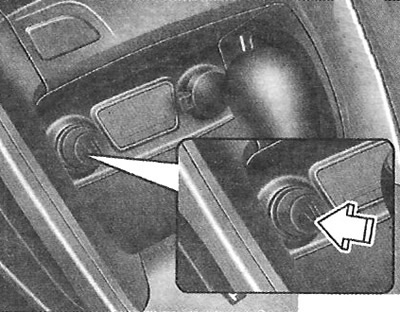
To operate the cigarette lighter, the ignition key must be in the ACC or ON position. To use it, press it down until it fits into its socket. Once its element has heated up, the cigarette lighter will pop out of the socket to the "ready" position. Do not leave the cigarette lighter in the pressed position. This may damage the heating element and create a fire hazard. If the cigarette lighter needs to be replaced, use only genuine Hyundai spare parts or approved equivalents.
Attention.
- Do not continue to press the cigarette lighter after it has heated up, as this may cause it to overheat.
- If the cigarette lighter does not come out of the socket within 30 seconds, remove it manually to avoid overheating.
Caution: Only use a genuine Hyundai cigarette lighter in the cigarette lighter socket. Using the socket to connect accessories (such as an electric shaver, hand-held vacuum cleaner, or coffee maker) may damage the socket or cause electrical system failure.
Ashtray (if available)
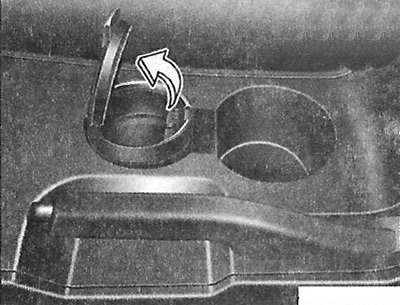
To use the ashtray, open the lid. To empty the ashtray, remove it.
Attention.
- Do not use vehicle ashtrays to collect waste.
- Placing a lit cigarette or match in an ashtray containing other flammable materials may cause a fire.
Drink holder
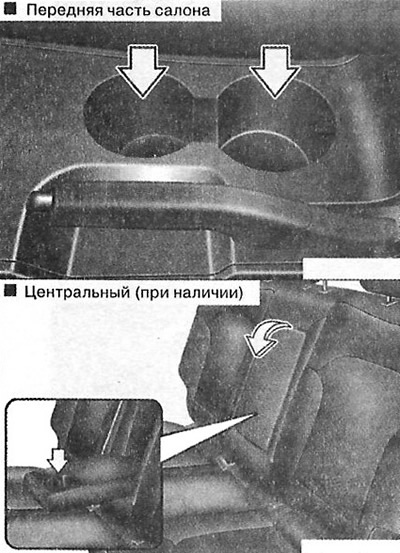
Drink holders can be used to hold glasses or small cans of drinks.
Attention.
- Hot liquids.
- Do not place open glasses containing hot liquids in the drink holder while the vehicle is moving. Spilled hot liquid may cause burns. If the driver receives such burns, it may result in loss of vehicle control.
- To reduce the risk of injury in the event of a sudden stop or collision, do not place open or unsecured bottles, cups, cans, etc. in the drink holder while the vehicle is moving.
Sun visor
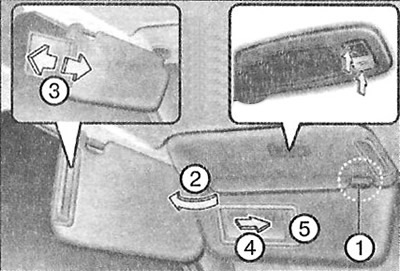
Use the sun visor to block direct light from the windshield or side window. To use the sun visor, pull it down. To use the visor to block light from the side window, pull it down, remove it from the holder (1), and turn it to the side (2). Adjust the position of the sun visor (3).
To use the mirror, pull the sun visor down and open the mirror cover (4). Press the switch to turn the light on or off.
 - turning on the lighting.
 - turning off the lighting.
A card holder (5) is provided for storing payment cards for using toll roads.
Attention.
- Mirror illumination lamp (if available).
- Always set the switch to the OFF position when the accessory mirror lamp is not in use. Closing the sun visor without turning off the lamp may cause battery drain or damage to the sun visor.
- The sun visor lock must always be used when the sun visor is deployed to the side.
Electrical outlet
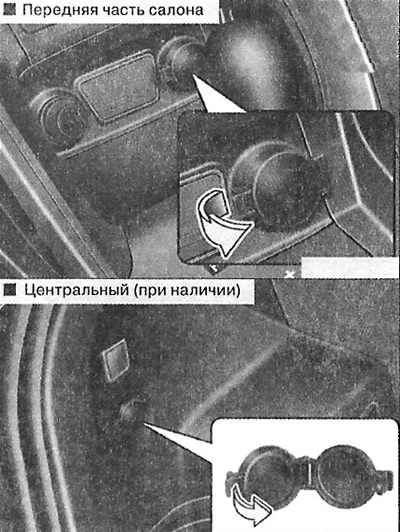
The electrical socket is designed to supply power to mobile phones or other devices that operate in the vehicle's electrical system. These devices must consume a current of no more than 10 A when the engine is running.
Attention.
- Electrical appliances should only be used when the engine is running; after use, they must be disconnected from the socket. Using the socket to power auxiliary devices for an extended period of time with the engine not running can cause the battery to discharge.
- Only electrical appliances rated for 12 V and consuming a current of no more than 10 A may be used.
- When using an electrical outlet, set the air conditioning or heating system to its minimum operating mode.
- Close the cover when the socket is not in use.
- Some electronic devices may cause interference when plugged into the vehicle's electrical outlet. They may cause increased noise when the audio system is running and may cause other electronic systems or devices in the vehicle to operate abnormally.
Caution: Do not insert fingers or foreign objects (pins, etc.) into the socket or touch it with wet hands. You may receive an electric shock.
Clock with digital display (if available)
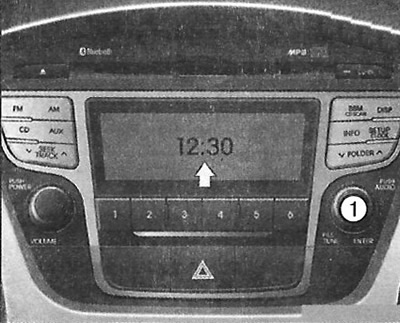
Warning: Do not set the time while the vehicle is moving. You may lose control, resulting in serious injury or an accident.
After any disconnection of the battery or the corresponding fuses, the time must be reset. When the ignition key is in the ACC or ON position, the clock is controlled using the buttons as follows.
Setting the clock
With the audio system turned off
1. Press and hold the SETUP button until the clock on the display starts flashing.
2. Set the time by turning the knob (1), then press it.
With the audio system on
1. Press the SETUP button.
2. Select the CLOCK mode by turning the knob (1), then press it.
The original text is available on the website: HyundaiBook
3. Set the time by turning the knob (1), then press it.
Ports: for additional devices, USB and iPod (if available)
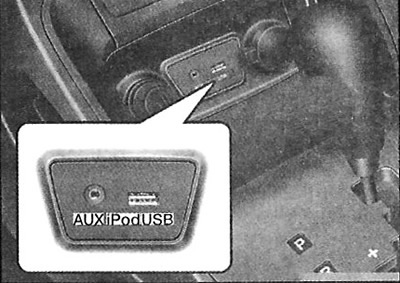
If your vehicle has an auxiliary and/or USB (Universal Serial Bus) port or iPod port, you can use the auxiliary port to connect audio devices, the USB port to connect USB devices, and the iPod port to connect an iPod.
Note: When connecting portable audio devices to the power outlet, noise may occur during playback. In this case, use the power supply of the portable audio device.
Note: iPod is a trademark of Apple Inc.
Floor mat fasteners (if available)
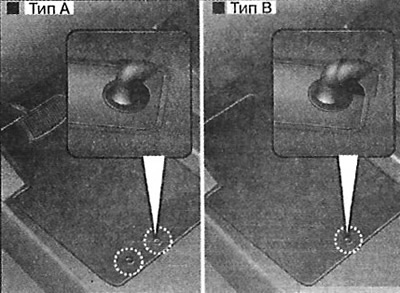
When using a floor mat on the floor covering under the front seat, make sure it is secured with the vehicle's floor mat anchors. This will prevent the mat from sliding forward.
Attention.
- To avoid eye injury, make sure the floor mat is positioned correctly on the floor covering. If the mat slides forward and obstructs the pedals while the vehicle is moving, it could cause an accident.
- Do not place an additional floor mat on top of the mat secured with clips. The additional mat may slide forward and thus obstruct the pedal movement.
Luggage net (if available)
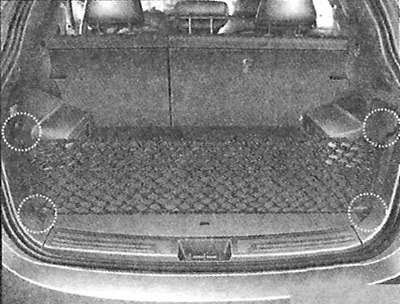
To prevent items from shifting in the luggage compartment, you can use the four anchor points of the luggage net. If necessary, contact an authorized Hyundai dealer to purchase a luggage net.
Caution: To prevent damage to items or the vehicle, care must be taken when placing fragile or bulky items in the luggage compartment.
Attention. Protect your eyes. Do not allow the net to be over-tensioned. Never stand in the way of a possible rebound of the net elements when they break, protect your face and other parts of your body. Do not use the net if it has visible signs of wear or damage.
Luggage compartment protective screen (if equipped)
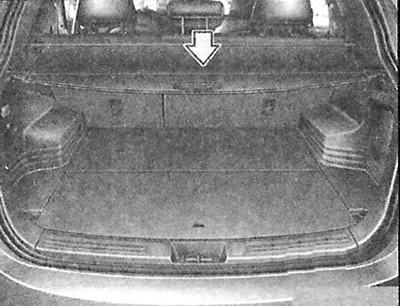
Use a luggage compartment screen to hide items in the luggage compartment from view.
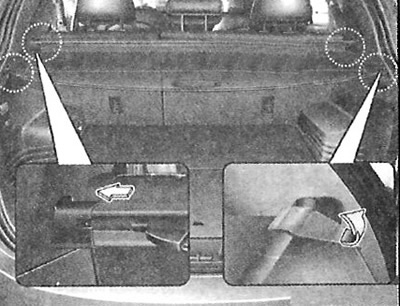
To use the luggage cover, pull the handle back and insert the edges into the slots.
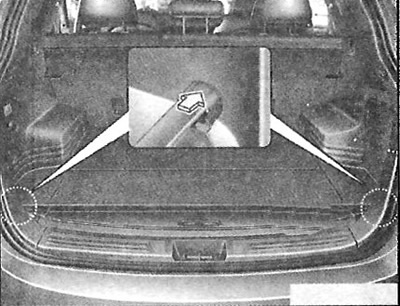
If the luggage compartment protective screen is not used, place it in the lower part of the luggage compartment (if equipped).
Attention.
- Do not place any objects on the luggage compartment protective screen. Such objects may be thrown into the passenger compartment and possibly cause injury to people in the event of an accident or when braking.
- Never allow people to be in the luggage compartment while the vehicle is moving. It is intended for luggage only.
- Maintain an even distribution of load in the vehicle, placing loads as close to the front of the vehicle as possible.
Caution: Since there is a risk of damage to the luggage compartment protective screen, do not place luggage on it.