


Removal
1. Turn the ignition key to the "OFF" position and disconnect the negative (-) cable from the battery.
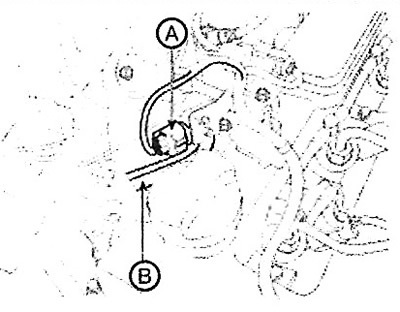
2. Disconnect the connector (A) of the diesel particulate filter (DPF) pressure change sensor.
3. Disconnect the diesel particulate filter (DPF) hoses (B).
4. Loosen the mounting screws and remove the diesel particulate filter (DPF) pressure change sensor.
Installation
Attention.
- Tighten the component mounting bolts to the specified torque.
- Be careful not to drop the component. If dropped, the component must be carefully checked before installation.
Installation is performed in the reverse order of removal.
Note: Tightening torque: Diesel particulate filter pressure change sensor mounting bolt: 9.8 - 11.8 Nm.
Replacement
Caution: After replacing the Diesel Particulate Filter (DPS) pressure change sensor, the Component Change Routine must be performed. Otherwise, a fault may occur that relates to engine performance or exhaust management and persists until the new component data is registered in the control unit.
1. Turn off the ignition.
2. Connect the GDS scanner to the data link connector (DLC).
3. Turn on the ignition.
4. Select "Vehicle, Model year, Engine, System".
The original text is published on the website HyundaiBook
5. Select Vehicle S/W Management (Vehicle Software Management).
6. Select Component Change Routine.
7. Select "Differential Pressure Sensor Change".
8. Follow the procedure according to the instructions on the screen.