HyundaiBook.ru
Repair Chevrolet Repair Honda Repair Toyota Repair Land Rover Repair VAZ Repair Renault Repair Nissan
English Русский
Български
Беларускі
Український
Српски
Hrvatski
Română
Polski
Slovenský
Magyar
ArticlesSitemapContacts  


  Accent   Elantra   Getz   Grandeur   Sonata   Santa Fe   Tucson   Others
Tucson 1 (2005-2010) Tucson 2 (2009-2015)
  • Main
  • Tucson
  • LM (2009-2015)
  • Body
  • Interior (internal elements)
  • Replacing the audio system

Replacing the audio system (Hyundai Tucson LM)

0
Note: To avoid damaging the lining when using a flat-head screwdriver as a lever, wrap the screwdriver with insulating tape. Also tape adjacent parts that require protection. Wear gloves to protect your hands from injury.


1. Remove the center panel trim (A).
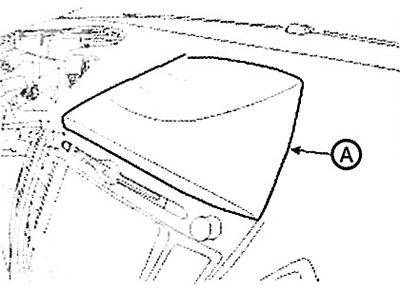
1. Remove the center panel trim (A).


2. Remove the hazard warning switch (A) assembly using a screwdriver or special puller.
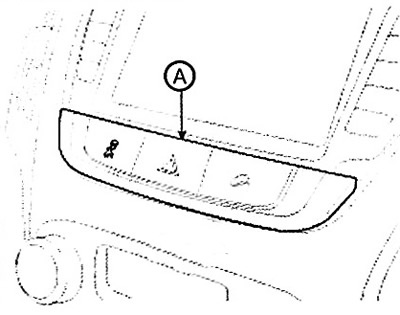
2. Remove the hazard warning switch (A)…


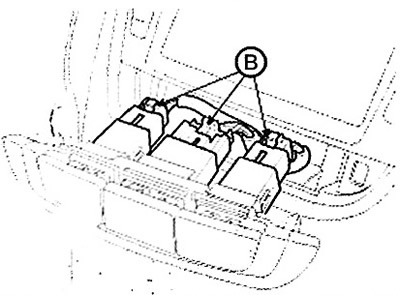
3. Disconnect the connectors (B).

3. Disconnect the connectors (B).


4. Loosen the mounting screws and remove the audio system (A).
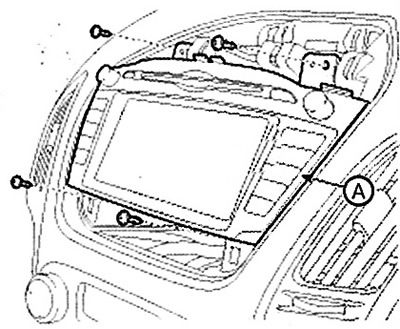


4. Loosen the mounting screws and…


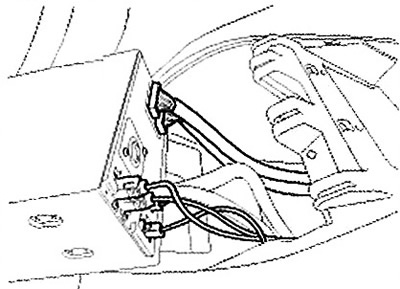
5. Disconnect the connectors.

5. Disconnect the connectors.


6. Installation is carried out in the reverse order of removal.

Note: Make sure the connectors are connected correctly.
This article is available at russian, bulgarian, belarusian, ukrainian, serbian, croatian, romanian, polish, slovak, hungarian
This article has been reviewed by: Konstantin Smirnov
Add to social network:

Previous
Tucson 2: Interior (internal elements)
Next

Replacing the bottom panel
Replacing the instrument cluster
Instrument panel — device
Central console
Replacing the glove box
Replacing the heater control panel
Replacing the casing
Replacing parts of the dashboard
Replacing the dashboard cross member
Ceiling panel
We recommend other articles on the topic of Hyundai manuals:

Replacing the air filter of the cabin ventilation system Hyundai Accent 3 (2005-2010)
Replacing the fluid in the steering system Hyundai Elantra 1 (1990-1995, petrol)
Notes when replacing air conditioning system components Hyundai Getz (2002-2011)
Audio system Hyundai Sonata 3 (1993-1998)
Replacing the air filter of the climate control system (for the… Hyundai Santa Fe 2 (2007-2012, petrol)
Replacing the car lighting system bulbs Hyundai Matrix (2001-2010, petrol)
Link in different formats to this article

Visitor comments
No comments yet


How much will 24 + 13 ?


Tucson 2 (2009-2015) 
  • General information
  • Faults en route
  • User manual
  • Maintenance
  • Power unit
  • Gasoline engines
  • Diesel engines
  • Engine cooling system
  • Engine lubrication system
  • Engine power system
  • Control system
  • Intake and exhaust systems
  • Engine electrical equipment
  • Transmission
  • Clutch
  • Mechanical gearbox
  • Automatic gearbox
  • Drive shafts
  • Chassis
  • Suspension and wheels
  • Brake system
  • Steering
  • Body
  • Exterior (external elements)
  • Interior (internal elements)
  • Security systems
  • Air conditioning and heater
  • Electrical equipment
  • Electrical circuits
Tucson 1 (2005-2010) 
  • General information
  • User manual
  • Maintenance
  • Power unit
  • Gasoline engine G6BA
  • Gasoline engine G4GC
  • Diesel engine D4EA
  • Fuel system (gasoline)
  • Fuel system (diesel)
  • Engine lubrication system
  • Engine cooling system
  • Engine electrical equipment
  • Transmission
  • Clutch
  • Car gearbox
  • Drive shafts and cardan
  • Chassis
  • Car suspension
  • Steering
  • Brake system
  • Body
  • Exterior (external elements)
  • Interior (internal elements)
  • Air conditioning and heater
  • Airbags
  • Electrical equipment
  • Equipment and devices
  • Electrical circuits
HyundaiBook.ru © 2018-2026 · Mobile version · Sitemap: EN BG BY UA RS HR RO PL SK HU · Administration · Site search · Hyundai owners Accent 1 · Accent 2 · Accent 3 · Elantra 1 · Elantra 2 · Elantra 3 · Getz · Sonata 3 · Sonata 4 · Santa Fe 2 · Tucson 1 · Tucson 2 · Matrix ·
This site uses cookies to optimize its functionality. By continuing, you agree to our terms.