


1. The traction control system (TCS) is designed to automatically prevent wheel slippage when starting off, accelerating and driving on slippery surfaces and ensures stable vehicle control. However, it should be borne in mind that on slippery road surfaces, even with the TCS system operating, the driver cannot always control the vehicle at high speed.
Caution: The TCS system does not provide active braking, so always reduce speed before turning. When driving in mud or snow, pressing the accelerator pedal may not increase engine speed.
2. When the ignition key is turned to the "ON" or "START" position, the TCS indicator lights up and goes out after a few seconds.
If the indicator does not light, the TCS system may be faulty.
3. If the TCS indicator light flashes while the vehicle is moving, the TCS system is operating to prevent wheel slippage.
In this case, it is recommended to ease off the accelerator pedal and maintain a moderate speed.
4. When the vehicle is moving, the TCS indicator will only light when the TCS switch is pressed (TCS off). If this indicator lights up when the wheels are slipping or when the vehicle is moving and does not go out, stop the vehicle and turn off the engine. If the indicator lights up even after the engine is started, the TCS may be faulty.
(The original source of the article is the website: «HyundaiBook.ru»)
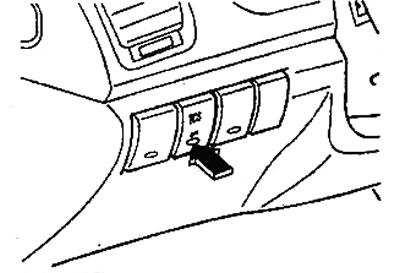
5. If the vehicle is stuck in snow or mud, depending on the situation, it may be necessary to turn the TCS system on/off. Pressing the TCS switch turns the system off and the TCS indicator lights up. Pressing the switch again turns the system on and the TCS indicator goes out.