
HyundaiBook.ru
Repair Chevrolet Repair Honda Repair Toyota Repair Land Rover Repair VAZ Repair Renault Repair Nissan
English Русский
Български
Беларускі
Український
Српски
Hrvatski
Română
Polski
Slovenský
Magyar
ArticlesSitemapContacts  


  Accent   Elantra   Getz   Grandeur   Sonata   Santa Fe   Tucson   Others
Matrix (2001-2010, petrol)
  • Main
  • Hyundai
  • Matrix (2001-2010)
  • Transmission
  • Automatic gearbox
  • Removal and installation of automatic transmission (A4AF3)

Removal and installation of automatic transmission (A4AF3) (Mitsubishi Matrix)

0
Contents: Removal ⇓ The order of installation of support…⇓ Installation ⇓

Removal


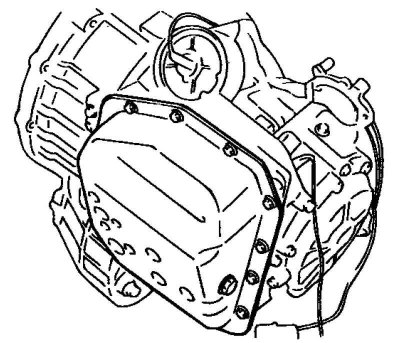
Fig. 3.98. Gearbox oil pan

Fig. 3.98. Gearbox oil pan


Unscrew the drain plug and drain the automatic transmission fluid (ATF) from the gearbox (Fig. 3.98).

Remove the air filter housing assembly.
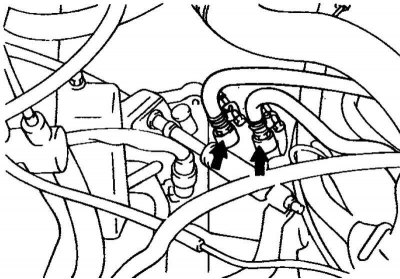
Fig. 3.99. Clamps for the oil cooler…

Fig. 3.99. Clamps for the oil cooler outlet and inlet hoses


Remove the clamps and disconnect the outlet and inlet hoses of the automatic transmission oil cooler (Fig. 3.99).

Note: After disconnecting the hoses, it is necessary to plug the holes in the hoses and fittings of the gearbox to prevent dust or foreign particles from getting into them.


Remove the automatic transmission control cable.
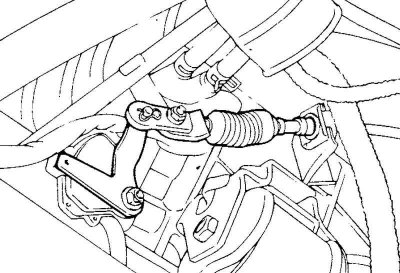
Fig. 3.100. Speedometer drive cable

Fig. 3.100. Speedometer drive cable


Remove the speedometer drive cable (Fig. 3.100).
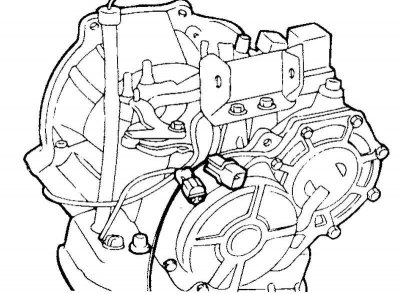
Fig. 3.101. Connectors of the starter…

Fig. 3.101. Connectors of the starter interlock switch, electromagnetic valves and automatic transmission oil temperature sensor


Disconnect the connectors of the starter lock switch (automatic transmission selector switch), electromagnetic valves, automatic transmission oil temperature sensor, and the downshift brake servo switch (Kickdown servo switch) (Fig. 3.101).
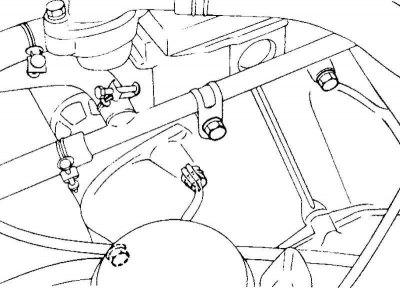
Fig. 3.102. Gearbox to engine mounting…

Fig. 3.102. Gearbox to engine mounting bolt


Unscrew the gearbox mounting bolt to the engine, located on the top of the gearbox (Fig. 3.102).
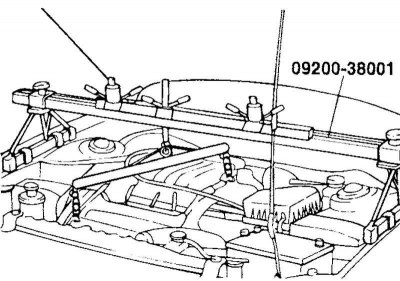
Fig. 3.103. Fastening the engine to the…

Fig. 3.103. Fastening the engine to the crossmember


Secure the engine to a special device (crossbar 09200-38001) using the mounting brackets (Fig. 3.103).

Raise the car on a lift.

Disconnect the tie rod ends, lower suspension arm ball joints and remove the wheel drive shafts. Remove the steering gear and anti-roll bar.

Disconnect the steering shaft universal joint.

Note: Mark the relative positions of the steering shaft universal joint and steering gear shaft before disconnecting them to facilitate subsequent assembly.
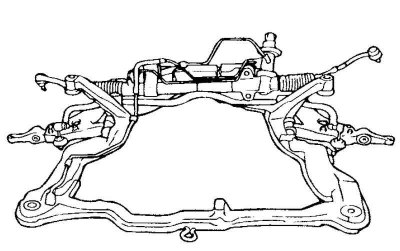

Fig. 3.104. Subframe mounting bolts

Fig. 3.104. Subframe mounting bolts


Loosen the mounting bolts and remove the subframe (Fig. 3.104).

Remove the starter.

Loosen the gearbox mounting bolts.

Loosen the bolts securing the gearbox to the engine.

Remove the gearbox assembly using a transmission telescopic jack (T/M jack).

Caution! The engine and gearbox mounts must be installed in a specific order.


The order of installation of support brackets


Side engine mount bracket.

Gearbox support bracket.

Rear engine mount bracket.

Front engine mount bracket.

Caution! Be careful when installing the front engine mount bracket, do not damage or deform the mount. If the mount is damaged, strong vibration of the power unit may occur when the engine is idling.


Installation
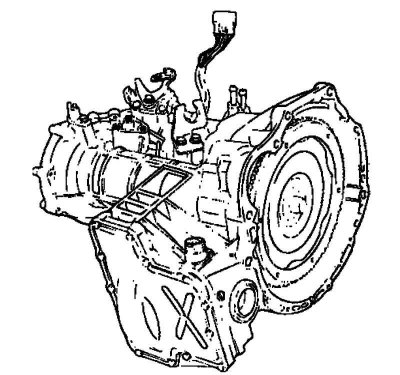


Fig. 3.105. Gearbox assembly

Fig. 3.105. Gearbox assembly


Connect the torque converter on the gearbox side and install the gearbox assembly on the engine (Fig. 3.105).
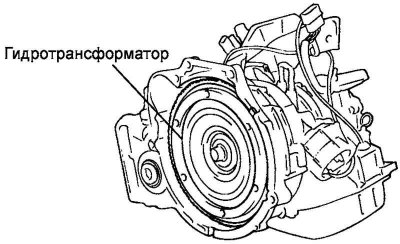
Fig. 3.106. Torque converter

Fig. 3.106. Torque converter


Caution! If the torque converter is first installed on the engine, the gearbox seal will be damaged when installing the gearbox. Therefore, always install the torque converter on the gearbox side before assembling the power unit (Fig. 3.106).
This article is available at russian, bulgarian, belarusian, ukrainian, serbian, croatian, romanian, polish, slovak, hungarian
This article has been reviewed by: Konstantin Smirnov
Add to social network:

Previous
Matrix: Automatic gearbox
Next

Removal and installation of automatic transmission (A4A42)
Low pressure regulation
Main Line Pressure Adjustment (A4A42)
Adjusting the servo drive of the forced downshift brake (A4A42)
Adjusting the starter interlock switch (automatic transmission selector switch) (A4A42)
Automatic transmission control mechanism
We recommend other articles on the topic of Hyundai manuals:

Drive axle in block with automatic transmission Hyundai Accent 1 (1994-1999)
General description of automatic transmission Hyundai Elantra 1 (1990-1995, petrol)
Automatic transmission selector lever — removal Hyundai Getz (2002-2011)
Automatic transmission (replacement of working fluid) Hyundai Sonata 3 (1993-1998)
Automatic transmission (4 and 5 speed) Hyundai Santa Fe 2 (2007-2012, petrol)
Automatic transmission — device Hyundai Tucson 1 (2005-2010)

Link in different formats to this article

Visitor comments
No comments yet


How much will 43 + 21 ?


Matrix (2001-2010, petrol) 
  • User manual
  • Control devices
  • Salon equipment
  • Car driving
  • Current service
  • Vehicle specifications
  • Power unit
  • Engine specifications
  • Engine maintenance
  • Engine repair 1.6 l
  • Engine repair 1.8 l
  • Cooling and lubrication system
  • Power and exhaust system
  • Control system
  • Transmission
  • Transmission specifications
  • Clutch
  • Mechanical gearbox
  • Automatic gearbox
  • Drive shafts
  • Chassis
  • Suspension and wheels
  • Steering
  • Brake system
  • Body
  • Exterior (external elements)
  • Passive safety system
  • Heater and air conditioner
  • Electrical equipment
  • Specifications
  • Equipment and devices
  • Power devices
  • Electrical circuits
HyundaiBook.ru © 2018-2026 · Mobile version · Sitemap: EN BG BY UA RS HR RO PL SK HU · Administration · Site search · Hyundai owners Accent 1 · Accent 2 · Accent 3 · Elantra 1 · Elantra 2 · Elantra 3 · Getz · Sonata 3 · Sonata 4 · Santa Fe 2 · Tucson 1 · Tucson 2 · Matrix ·
This site uses cookies to optimize its functionality. By continuing, you agree to our terms.