
HyundaiBook.ru
Repair Chevrolet Repair Honda Repair Toyota Repair Land Rover Repair VAZ Repair Renault Repair Nissan
English Русский
Български
Беларускі
Український
Српски
Hrvatski
Română
Polski
Slovenský
Magyar
ArticlesSitemapContacts  


  Accent   Elantra   Getz   Grandeur   Sonata   Santa Fe   Tucson   Others
Santa Fe 2 (2007-2012, petrol)
  • Main
  • Santa Fe
  • CM (2007-2012)
  • Electrical equipment
  • Equipment and devices
  • Removal, checking and installation cruise control system components

Removal, checking and installation cruise control system components (Hyundai Santa Fe CM)

0
Contents: System components and their operation ⇓ Removal ⇓ Checking the main switch of the SPPS ⇓ Checking the brake light switch ⇓ Checking the work ⇓ Troubleshooting Guide ⇓ Adjusting the cable ⇓
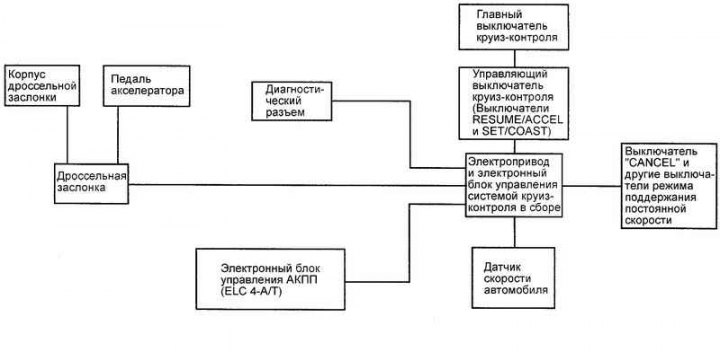
Fig. 7.71. Block diagram of the…

Fig. 7.71. Block diagram of the constant speed maintenance system


System components and their operation
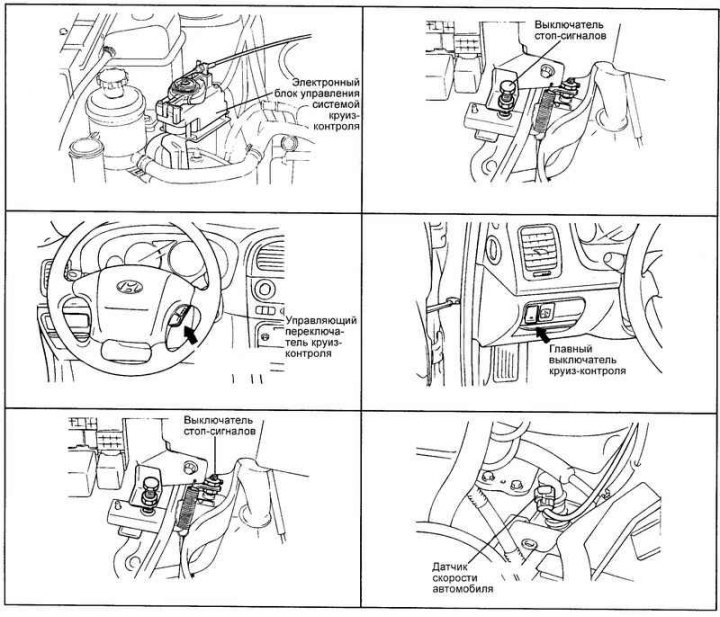


Fig. 7.72. Location of cruise control…

Fig. 7.72. Location of cruise control system components


The arrangement of the components of the cruise control system is shown in Fig. 7.72 and 7.73.
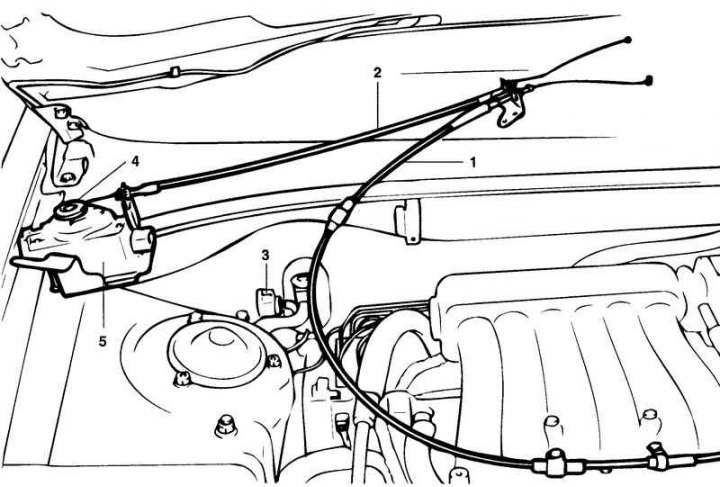
Fig. 7.73. Connecting the cables and…

Fig. 7.73. Connecting the cables and electrical connectors of the constant speed control system: 1 – connection of the accelerator pedal cable and the connector housing assembly; 2 – connection of the cruise control drive cable and the connector of the electric drive sector of the cruise control system; 3 – Cruise control system electric drive connector; 4 – sector of the electric drive of the cruise control system; 5 – Electric drive of the cruise control system


Removal


Disconnect the battery.

Disconnect the accelerator and ESP control cables from the throttle body.

Disconnect the accelerator cable from the accelerator pedal.
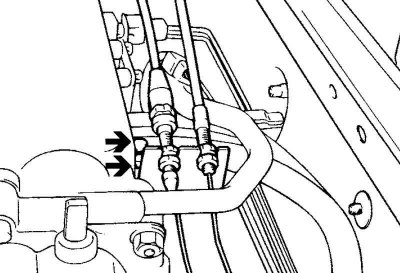
Fig. 7.74. Accelerator cable support…

Fig. 7.74. Accelerator cable support clips


Loosen the bolts securing the accelerator cable support clips (Fig. 7.74).

Loosen the bolts securing the SPS drive and remove the drive.

Installation is carried out in reverse order.

Checking the main switch of the SPPS
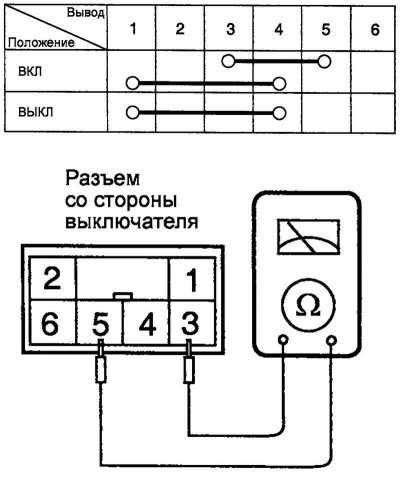


Fig. 7.75. Circuit diagram for testing…

Fig. 7.75. Circuit diagram for testing the main switch of the SPPS


Check the switch circuits according to the table in Figure 7.75.

If the test results are negative, replace the switch.

Checking the brake light switch
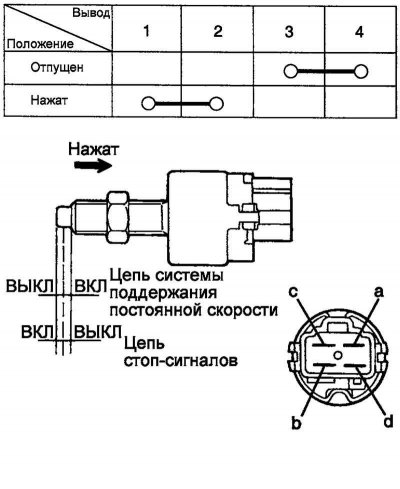


Fig. 7.76. Brake light switch test…

Fig. 7.76. Brake light switch test diagram


Check the switch circuits with the switch button pressed and released (Fig. 7.76).

Checking the work


Checking and adjusting the system operation is carried out with the electrical loads turned off.

Warm up the engine until the idle speed stabilizes. Check that the speed complies with technical standards.

Turn off the ignition.

Make sure there are no sharp bends in the control cables.

Press the accelerator pedal: the throttle lever should move from stop to stop smoothly, without jerking.

Check the cable tension adjustment.

If there is excessive slack or no slack at all, adjust the tension of the cables.

Troubleshooting Guide


If the cables are too loose when moving uphill, there will be a significant drop in speed

If there is no slack in the cable, the idle speed will be higher than normal.

Adjusting the cable


Connect the cable to the drive traction roller.

Pull the cable sheath until the slack in the cable is taken up. Tighten the nut "b" until it touches the bracket.
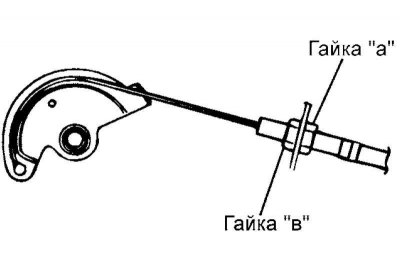
Fig. 7.77. Accelerator cable adjustment…

Fig. 7.77. Accelerator cable adjustment diagram


Loosen nut "b" one turn (Fig. 7.77).

Tighten lock nut "a".

As a result of the actions taken, the deflection of the cable between the roller and the bracket should be approximately 1 mm (the drive roller comes to rest).
This article is available at russian, bulgarian, belarusian, ukrainian, serbian, croatian, romanian, polish, slovak, hungarian
This article has been reviewed by: Konstantin Smirnov
Add to social network:

Previous
Santa Fe 2: Equipment and devices
Next

Ignition Coil (2.7L V6 Engine)
High Tension Spark Plug Wire Routing (2.7L V6 Engine)
Removal, checking and installation the ignition switch
Ignition coil with built-in power transistor (2.4L I4 engine)
General information about the ignition system
Automatic transmission control system diagram (2.4 l)
Automatic transmission control system diagram (2.7 l)
We recommend other articles on the topic of Hyundai manuals:

Checking the elements of the automatic transmission control… Hyundai Accent 3 (2005-2010)
Cylinder Head Components — Cleaning and Checking Hyundai Elantra 1 (1990-1995, petrol)
Checking the technical condition and operability of the brake… Hyundai Getz (2002-2011)
Cruise control system Hyundai Sonata 4 (2001-2012, petrol)
Checking the technical condition of the control system of… Hyundai Tucson 2 (2009-2015)
Checking the components of the automatic transmission control… Hyundai Matrix (2001-2010, petrol)

Link in different formats to this article

Visitor comments
No comments yet


How much will 18 + 39 ?


Santa Fe 2 (2007-2012, petrol) 
  • User manual
  • Control devices
  • Heating and ventilation
  • Seat control
  • Car driving
  • Maintenance and care
  • Vehicle Specifications
  • Engine 2.0 and 2.4 liters
  • Engine specifications
  • Engine maintenance
  • Engine repair
  • Cooling system
  • Intake and exhaust system
  • Fuel system
  • Engine 2.7 liter
  • Engine maintenance
  • Engine repair
  • Cooling system
  • Intake and exhaust system
  • Transmission
  • Transmission specifications
  • Mechanical gearbox
  • Automatic gearbox
  • Drive shafts
  • Chassis
  • Suspension and wheels
  • Steering
  • Brake system
  • Body
  • Exterior (external elements)
  • Electrical equipment
  • Equipment and devices
  • Power devices
  • Specifications
HyundaiBook.ru © 2018-2026 · Mobile version · Sitemap: EN BG BY UA RS HR RO PL SK HU · Administration · Site search · Hyundai owners Accent 1 · Accent 2 · Accent 3 · Elantra 1 · Elantra 2 · Elantra 3 · Getz · Sonata 3 · Sonata 4 · Santa Fe 2 · Tucson 1 · Tucson 2 · Matrix ·
This site uses cookies to optimize its functionality. By continuing, you agree to our terms.