


Contents: State of readiness ⇓ Alarm status ⇓ Disconnection state ⇓ Remote control door lock system…⇓ Replacing the battery ⇓ Opening the door glass with a…⇓ Opening the hood ⇓ Remote opening of the fuel filler cap ⇓
This system is designed to prevent unauthorized entry into the car. It has three states: the first is readiness, the second is alarm, and the third state is off. When the anti-theft system is triggered, the sound alarm (siren) is turned on and the direction indicators start flashing.
State of readiness
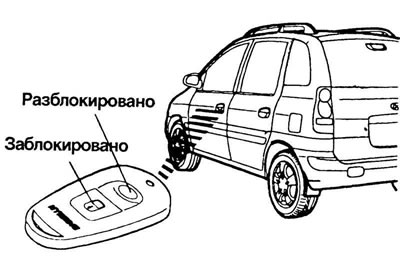
Park the car and turn off the engine. Bring the system to the ready state (Fig. 1.14).
Remove the key from the ignition.
Make sure the hood and tailgate are locked.
Lock the doors using the remote control door lock transmitter.
After completing the above steps, the direction indicators will flash once to indicate that the system is in the ready state.
Note. If any of the doors, tailgate, or hood are open, the system will not be put in a ready state. If this happens, take the system out of the ready state as described below.
Warning! Do not arm the system until all passengers have left the vehicle. When passengers leave the vehicle, the audible alarm (siren) may sound.
Alarm status
The alarm is triggered when the vehicle is parked and the system is in the ready state in one of the following cases:
- opens the front or rear door without using the transmitter;
- opens the back door without using the transmitter;
- the hood opens.
In these cases, the sound alarm (siren) will sound and the direction indicators will flash for 27 seconds. To turn off the system, unlock the side doors or the rear door using the transmitter.
Disconnection state
The system is deactivated when the driver or passenger door is unlocked by pressing the "UNLOCK" button on the transmitter (Fig. 1.15).
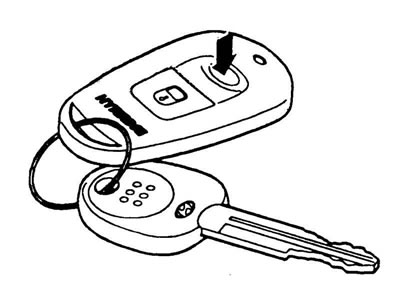
After this, the direction indicators will flash twice, indicating that the system is turned off.
Note: After shutdown, the system can be brought into the ready state only by performing the above operations.
The system can only be deactivated using the transmitter. If the transmitter does not work when the anti-theft system is in the ready state, the following measures must be taken:
- open the door with the key. In this case, the sound alarm (siren) will sound;
- insert the key into the ignition switch and turn it to the "ON" position;
- wait 30 sec.
After this the system will be disabled.
Remote control door lock system (additional equipment)
Locking doors
1. Close all doors.
2. Press the "LOCK" button on the transmitter.
The basis of the material is information from the website (HYUNDAIBOOK.ru)
3. The direction indicators will flash once to indicate that the doors are locked.
Unlocking doors
1. Press the "UNLOCK" button on the transmitter.
2. The direction indicators will flash twice to indicate that all doors are unlocked.
Replacing the battery
When the transmitter battery starts to run low, it may take several button presses to open or close the doors, and the indicator light will not light. In this case, replace the battery as soon as possible.
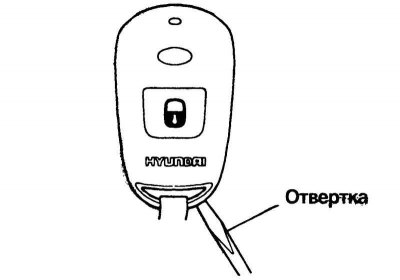
Fig. 1.16. Opening the case with a screwdriver
To replace the element, separate the transmitter housing using a screwdriver, as shown in Figure 1.16.
Remove the old battery from the housing, noting the polarity. Make sure the polarity of the new battery is correct (the "+" side faces down) and install it (Fig. 1.17).
Opening the door glass with a mechanical window lifter
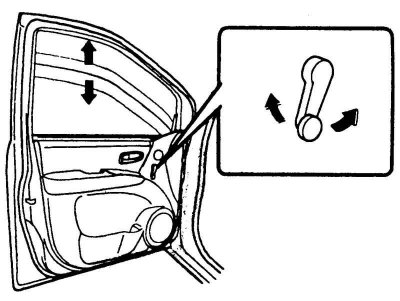
Fig. 1.18. Raising and lowering the glass
To raise or lower the door glass, turn the window lift handle clockwise or counterclockwise (Fig. 1.18).
Opening the hood
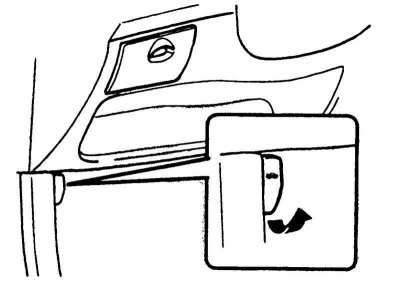
Fig. 1.19. Hood lock drive handle
To open the hood, pull the hood lock handle towards you (Fig. 1.19).
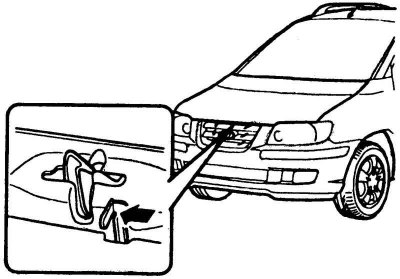
Fig. 1.20. Safety lever
Press the safety lever and lift the hood (Fig. 1.20).
Support the hood with a support rod.
To close the hood, remove the support rod and secure it in the retainer. Slowly lower the hood to a position 30 cm above the closed position and release the hood to allow it to fall under its own weight. Make sure the hood is securely latched.
Warning! Before driving, make sure that the hood is securely closed. A hood that is not completely closed may suddenly open while the vehicle is moving, which will result in complete loss of visibility, and, in turn, may lead to a traffic accident (crash).
Remote opening of the fuel filler cap
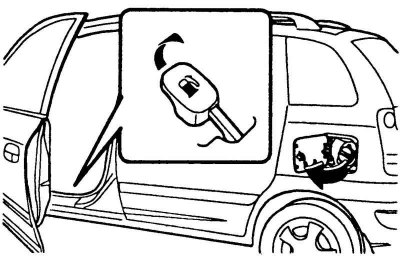
Fig. 1.21. Fuel tank filler cap opening lever
The fuel filler cap can be opened from inside the vehicle by pulling up on the cap release lever located on the floor at the front left of the vehicle (Fig. 1.21).
Note. If the fuel filler cap cannot be opened due to icing, tap or press the cap lightly to break the ice and open the cap. If necessary, use an approved de-icing spray (do not use antifreeze from the cooling system) or place the vehicle in a heated area and wait for the ice to melt.
Note: To open the trunk lid without using the key, pull the trunk lid release lever. To close the trunk lid, lower it, and then push it down until it locks. To make sure the trunk lid is securely locked, try lifting it again.
Warning! Gasoline vapors are poisonous. Always turn off the engine before refueling. When handling fuel, make sure there is no open flame nearby. If replacement is necessary, install only the original filler cap.
Caution! Sometimes when unscrewing the cap at high ambient temperatures, a slight "hissing" may be heard. This is normal and is not a cause for concern. When opening the fuel filler cap, turn it slowly.