


Contents: Buzzer for sound signal when rear…⇓ Fuel level indicator ⇓ Coolant temperature gauge ⇓ Speedometer ⇓ Tachometer ⇓ Odometer (trip meter)/daily mileage…⇓ Digital odometer/trip counter…⇓ Odometer (trip counter). ⇓ Daily mileage counter. ⇓ Trip computer (additional equipment) ⇓ Reset button ⇓ Mileage on fuel remaining in the tank ⇓ Average speed ⇓ Travel time ⇓ Sound alarm buzzer (additional…⇓ Parking brake warning buzzer…⇓ Buzzer signaling wear of brake pads ⇓
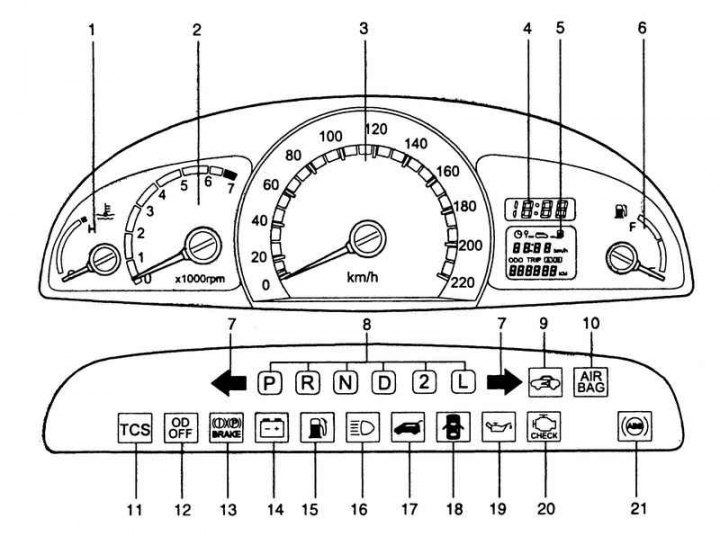
Fig. 1.24. Hyundai Matrix vehicle controls: 1 – coolant temperature indicator; 2 – tachometer; 3 – speedometer; 4 – electronic clock; 5 – odometer (trip counter) / daily mileage counter / trip computer (additional equipment); 6 – fuel level indicator; 7 – direction indicator lamp; 8 – Automatic transmission selector position indicator lamp (only for models with automatic transmission); 9 – control lamp indicating immobilizer malfunction (additional equipment); 10 – Supplemental Restraint System (SRS) malfunction indicator lamp (optional equipment); 11 – Anti-skid system control lamp (traction control) (additional equipment); 12 – Overdrive switch off indicator lamp (only for models with automatic transmission); 13 – Parking brake/brake fluid emergency level indicator lamp; 14 – Low battery indicator lamp; 15 – Fuel reserve indicator lamp; 16 – High beam indicator lamp; 17 – Rear door open warning light; 18 – Door open signal indicator light; 19 – Oil pressure indicator lamp; 20 – Engine Malfunction Indicator Lamp (mil) (optional); 21 – Anti-lock braking system (ABS) malfunction indicator lamp (additional equipment)
The instrument cluster of the Hyundai Matrix is shown in Fig. 1.24.
Buzzer for sound signal when rear fog light is switched on (additional equipment)
The rear fog light alarm buzzer sounds when the rear fog lights are on and the driver's door is open.
Fuel level indicator
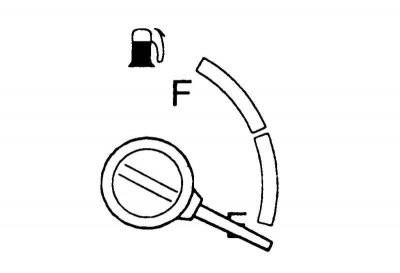
Fig. 1.25. Fuel level indicator
The arrow on this indicator shows the approximate fuel level in the fuel tank.
Coolant temperature gauge
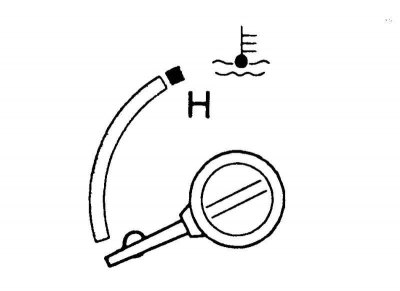
Fig. 1.26. Coolant temperature gauge
Warning! Do not open the radiator cap while the engine is hot. The cooling system is under pressure and opening the cap may cause hot fluid to spray out, which may cause severe burns. Wait until the engine has cooled down before opening the radiator cap.
Attention! The arrow of this indicator must be within the normal range. If the arrow of the indicator entered the "H" ("hot") zone of the scale while the engine is running, stop the car immediately and turn off the engine. Open the hood and check the coolant level in the expansion tank and the coolant pump drive belt.
Speedometer
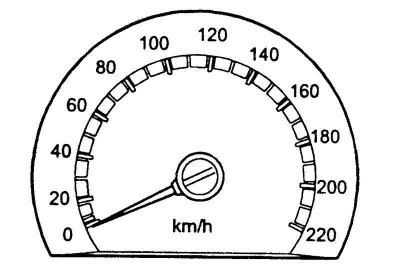
Fig. 1.27. Speedometer
The speedometer shows the current speed of movement.
Note: The speedometer operation is affected by the tire size installed on the vehicle. If the tire size (diameter, not width) has changed from the factory tires, contact a service station to reprogram the engine management system. It is recommended to contact an authorized Hyundai service station. If reprogramming is not performed, the speedometer will not display the correct speed.
Tachometer
Models with petrol engine.
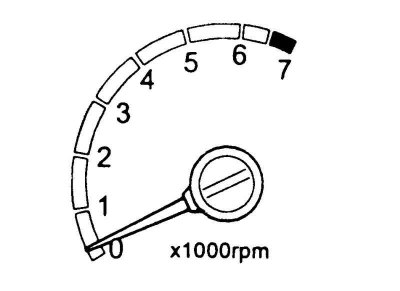
Fig. 1.28. Tachometer
The tachometer shows the engine speed in revolutions per minute (rpm). The tachometer helps you choose a more economical driving mode and also warns you when the engine speed exceeds the maximum permissible value.
Attention! While driving, watch the tachometer readings. Its needle, which shows the engine crankshaft speed, should not enter the red zone (the zone where the maximum permissible speed is exceeded).
Odometer (trip meter)/daily mileage meter
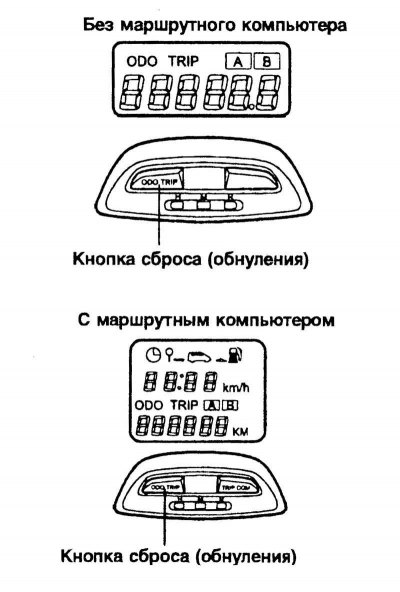
Fig. 1.29. Odometer
Digital odometer/trip counter function.
When the reset button is pressed with the ignition key turned to the "ON" position, the display changes in the order shown below.
Odometer (trip counter).
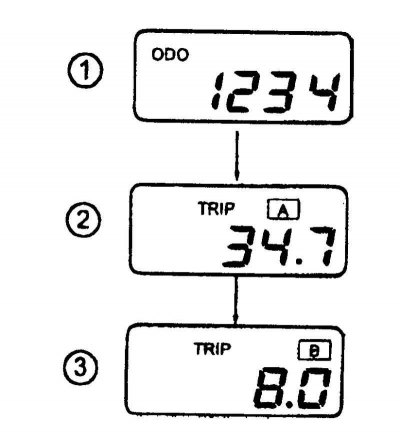
Fig. 1.30. Odometer mode switching diagram
The odometer shows the total distance in kilometers or miles traveled by the vehicle and is very useful for monitoring the intervals for periodic maintenance.
Daily mileage counter.
The trip meter shows the distance in miles or kilometers traveled over two trips.
TRIP A (mileage A): mileage from the start of the trip to the intermediate point.
TRIP B (mileage B): the mileage from the stopover to the end of the trip.
Pressing the reset button allows you to switch TRIP A (mileage A) to TRIP B (mileage B). To reset the counter, press the reset button.
Trip computer (additional equipment)
(The original version is stored on the website: HyundaiBook.ru)
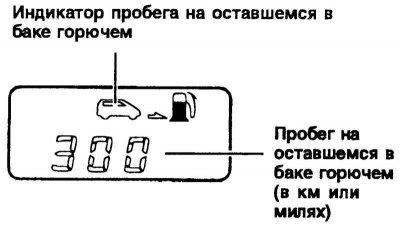
Fig. 1.32. Trip computer display readings on the amount of fuel remaining in the tank
A trip computer is an electronic device that displays trip information on a liquid crystal display – trip meter readings, average speed and estimated mileage on the remaining fuel in the tank.
Reset button
The information on the multifunction display is reset by pressing the reset button.
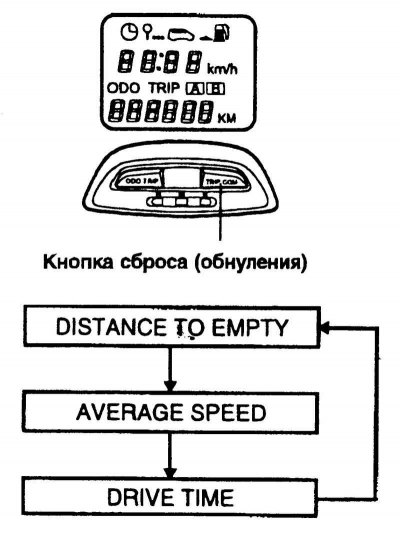
Fig. 1.31. Trip computer mode switching diagram
At the same time, the display readings change (see Fig. 1.31).
Mileage on fuel remaining in the tank
This mode shows the estimated mileage on the remaining fuel in the tank.
If more than 6 liters of fuel is added to the tank, the trip computer detects that the fuel needs to be refilled.
After installing or connecting the battery, the mileage data on the remaining fuel in the tank will be updated after the car has traveled 32 km.
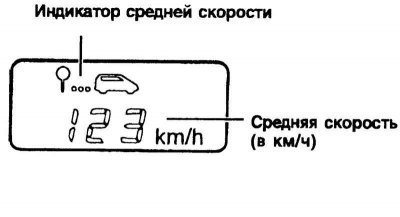
Fig. 1.33. Display readings of the trip computer on the average speed of the vehicle
Note: The mileage information on the remaining fuel in the tank may differ from the actual mileage due to changes in driving conditions. In addition, the information may change due to changes in driving conditions, driving style and driving speed.
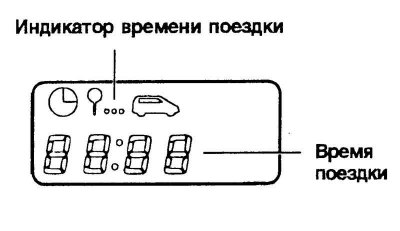
Fig. 1.34. Trip computer display showing travel time
Average speed
This mode shows the average speed since the last reset of the trip time.
When you press the reset button in the average speed display mode for 1 second, the average speed is reset to 0.
Travel time
This mode displays the total trip time since the last trip time reset. Pressing the reset button for 1 second in the trip time display mode resets the trip time to 0.
 Additional passive restraint system malfunction indicator lamp (SRS) (SRI) (additional equipment).
This indicator light (SRI) comes on and flashes for approximately 6 seconds after the ignition switch is turned to the "ON" position or after the engine is started, and then goes out.
This indicator light also comes on if there is a malfunction in the supplemental restraint system (SRS). If the indicator light (SRI) does not come on or remains on after flashing for approximately 6 seconds after the ignition switch is turned to the "ON" position or comes on while the vehicle is being driven, have the vehicle checked by an authorized Hyundai dealer.
 Anti-lock brake system malfunction indicator lamp (ABS) (SRI) (additional equipment).
After turning the ignition key to the "ON" position, the anti-lock brake system malfunction indicator lamp comes on (ABS SRI) and then goes out after a few seconds.
If this light remains on, comes on while driving, or does not come on after turning the ignition key to the "ON" position, it indicates a malfunction of the anti-lock brake system (ABS). If this occurs, have the vehicle checked by an authorized Hyundai dealer as soon as possible. The standard brake system will continue to operate, but without the assistance of the anti-lock brake system (ABS).
Caution! If the anti-lock brake system malfunction indicator lamp (ABS SRI) and the parking brake/brake fluid warning light remain on after the engine has started or come on while the vehicle is moving, there may be a malfunction in the EBD (Electronic Brakeforce Distribution) system. If this occurs, avoid sudden braking and have the vehicle checked by an authorized Hyundai dealer as soon as possible.
 Overdrive disengagement indicator lamp (optional equipment).
When the overdrive is engaged, the overdrive off indicator lamp is off. When the overdrive is disengaged, this lamp lights up red.
 Direction indicator lamps.
The green arrow on the instrument panel indicates the direction of the turn. If the arrow lights up but does not flash, flashes too quickly, or does not flash at all, this indicates a fault in the electrical circuit of the turn signals.
 High beam indicator lamp.
This indicator lamp comes on when the high beam headlights are on or when the headlights are flashing.
 Oil pressure warning light.
Driving with low engine oil or with the oil pressure warning light on may cause engine failure (scuffing, seizure, etc.). If this light comes on while the engine is running, the engine oil pressure is below the minimum permissible value. In good condition, this light comes on when the ignition key is turned to the "ON" position and goes out after the engine starts. If this light remains on after the engine starts, there is a serious engine malfunction. In this case, immediately stop the car in a safe place, turn off the engine and check the engine oil level.
If the oil level is below the minimum, add oil to the engine to the normal level and start the engine again. If the light remains on after starting the engine, turn it off immediately.
 Parking brake/brake fluid level warning light.
Operation of the control lamp.
The parking brake/brake fluid warning light should come on when the parking brake is applied and the ignition key is turned to the "ON" or "START" position. After the engine starts, the light should go out when the parking brake is released.
When the parking brake is released, the parking brake/brake fluid warning light should illuminate when the ignition key is turned to the "ON" or "START" position and go out when the engine starts. If this light comes on at any other time, slow down and stop the vehicle completely at the side of the road in a safe place. The brake system warning light indicates that the brake fluid level in the brake fluid reservoir is below the minimum level and that DOT3 or DOT4 brake fluid must be added.
If any faults in the brake system are detected, the vehicle must not be driven. The vehicle is equipped with a dual-circuit diagonal braking system. This means that even if one of the brake circuits is damaged, both wheels can be used for braking. In this case, more force on the brake pedal and a longer brake pedal travel will be required to stop the vehicle. Moreover, the vehicle's braking distance will be increased. If one of the brake circuits fails, engage a lower gear to use the engine braking effect to stop the vehicle.
 Low battery indicator light.
This light comes on when the ignition key is in the "ON" position and goes out after the engine starts. If this light stays on after the engine starts, there is a problem with the charging system. If the light comes on while the vehicle is moving, stop the vehicle immediately and look under the hood. First, check the alternator drive belt for damage, and if it is, check its tension.
Warning! If the alternator drive belt becomes loose or breaks while the vehicle is moving, it can cause serious engine damage. The engine may overheat because this belt also drives the engine coolant pump.
 Rear door open warning light.
This lamp remains on until the rear door is completely closed.
 Door open warning light.
This lamp warns that one of the side doors of the car is not closed tightly.
 Fuel reserve indicator light.
This lamp lights up when the fuel level in the fuel tank reaches the minimum reserve value. When this lamp lights up, it indicates that refueling is required. Driving the vehicle with the fuel reserve indicator lamp on or if the fuel level is below the "E" (empty) mark may cause misfires and damage the catalytic converter.
 Malfunction Indicator Lamp (MIL) (optional equipment).
This lamp lights up when a fault is detected in the components (parts) related to the emission control systems. It also lights up when the ignition key is turned to the "ON" position and should go out after a few seconds (only on models with an engine capacity of 1.5 / 1.6 liters).
This light comes on when the ignition key is turned to the "ON" position and then goes out immediately after the engine starts (1.8L models only). If this light comes on while the vehicle is being driven or does not come on after the ignition key is turned to the "ON" position, take the vehicle to your nearest authorized Hyundai dealer to have the systems checked.
 Traction Control Light (TCL) (optional).
This indicator lamp lights up according to the position of the ignition key and indicates that this system is operating.
The lamp comes on when the ignition key is turned to the "ON" position and goes out after a few seconds.
Sound alarm buzzer (additional equipment)
The horn buzzer sounds when the tail lights are on and the driver's door is opened. This serves to prevent the battery from being discharged when the car is left with the tail lights on. This buzzer will sound until the tail lights are turned off.
Parking brake warning buzzer (optional)
If the vehicle is moving at a speed of more than 10 km/h for 2-3 seconds and the parking brake is applied, the warning buzzer sounds continuously.
Buzzer signaling wear of brake pads
The front disc brake pads have wear indicators that make a high-pitched squealing sound when the pad is completely worn out, signaling the need to replace the front brake pads. While driving, this sound may appear and disappear or be constant. It can also be heard when pressing hard on the brake pedal. If you drive with worn brake pads, you can damage the brake disc.