
HyundaiBook.ru
Repair Chevrolet Repair Honda Repair Toyota Repair Land Rover Repair VAZ Repair Renault Repair Nissan
English Русский
Български
Беларускі
Український
Српски
Hrvatski
Română
Polski
Slovenský
Magyar
ArticlesSitemapContacts  


  Accent   Elantra   Getz   Grandeur   Sonata   Santa Fe   Tucson   Others
Matrix (2001-2010, petrol)
  • Main
  • Hyundai
  • Matrix (2001-2010)
  • Chassis
  • Brake system
  • Removal and installation the brake pedal

Removal and installation the brake pedal (Mitsubishi Matrix)

0
Contents: Removal ⇓ Examination ⇓ Installation ⇓
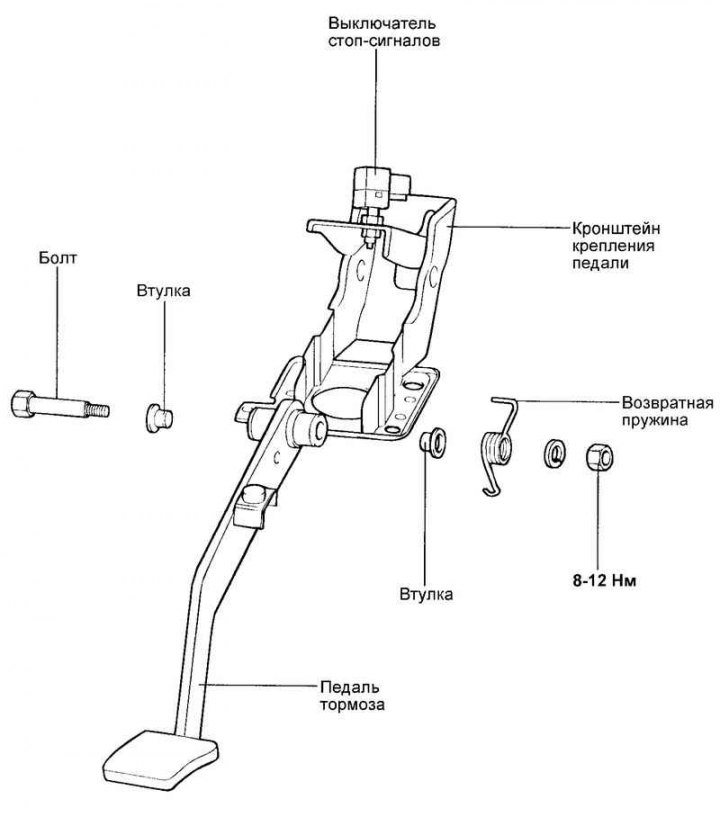
Fig. 6.15. Brake pedal

Fig. 6.15. Brake pedal


Removal


Remove the brake light switch.

Remove the cotter pin and pull out the tie rod pin.
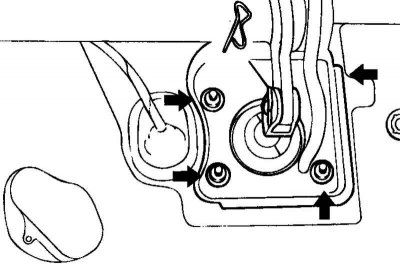
Fig. 6.16. Brake pedal bracket mounting…

Fig. 6.16. Brake pedal bracket mounting nuts


Loosen the nuts securing the brake pedal bracket (Fig. 6.16).

Remove the bracket together with the brake pedal.

Examination


Assess the degree of wear on the pedal bushings.

Make sure there is no deformation of the pedal.

Check the return spring.

Check the brake light switch.
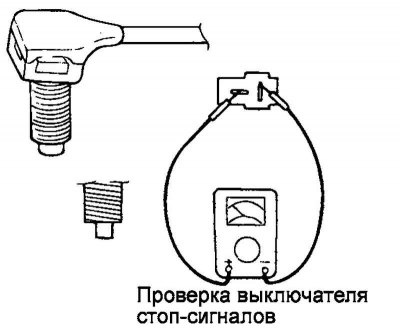
Fig. 6.17. Measuring the resistance…

Fig. 6.17. Measuring the resistance between the switch terminals


Using an ohmmeter, measure the resistance between the switch terminals (Fig. 6.17).

If the circuit is open when the switch pusher is pressed (infinite resistance), and there is one when the pusher is released (zero resistance), the switch is normal.

Installation


Installation is carried out in reverse order.

Note: Don't forget to secure the earring pin with a cotter pin.


Tighten the pedal bracket mounting nuts to the specified torque of 13–16 N·m.

Adjust the pedal height and free play.

Install the brake light switch.
This article is available at russian, bulgarian, belarusian, ukrainian, serbian, croatian, romanian, polish, slovak, hungarian
This article has been reviewed by: Konstantin Smirnov
Add to social network:

Previous
Matrix: Brake system
Next

Checking the brake system lines
Removal and installation the brake booster
Checking and adjusting the travel of the parking brake lever
Bleeding the brake hydraulic system
Checking the operation of the brake booster without a tester
Removal, checking and installation front brake pads
Disassembly, inspection and assembly of the brake caliper
Disassembly, inspection, assembly and installation of the master brake cylinder
Rear brake pressure regulator
Removal, checking and installation rear drum brakes
We recommend other articles on the topic of Hyundai manuals:

Brake pedal — device Hyundai Accent 1 (1994-1999)
Checking the free travel of the brake pedal Hyundai Elantra 3 (2000-2006)
Checking the free travel of the brake pedal Hyundai Getz (2002-2011)
Brake pedal Hyundai Sonata 3 (1993-1998)
Checking and adjusting the brake pedal Hyundai Santa Fe 2 (2007-2012, petrol)
Adjusting the height of the brake pedal above the floor Hyundai Tucson 1 (2005-2010)

Link in different formats to this article

Visitor comments
No comments yet


How much will 11 + 21 ?


Matrix (2001-2010, petrol) 
  • User manual
  • Control devices
  • Salon equipment
  • Car driving
  • Current service
  • Vehicle specifications
  • Power unit
  • Engine specifications
  • Engine maintenance
  • Engine repair 1.6 l
  • Engine repair 1.8 l
  • Cooling and lubrication system
  • Power and exhaust system
  • Control system
  • Transmission
  • Transmission specifications
  • Clutch
  • Mechanical gearbox
  • Automatic gearbox
  • Drive shafts
  • Chassis
  • Suspension and wheels
  • Steering
  • Brake system
  • Body
  • Exterior (external elements)
  • Passive safety system
  • Heater and air conditioner
  • Electrical equipment
  • Specifications
  • Equipment and devices
  • Power devices
  • Electrical circuits
HyundaiBook.ru © 2018-2026 · Mobile version · Sitemap: EN BG BY UA RS HR RO PL SK HU · Administration · Site search · Hyundai owners Accent 1 · Accent 2 · Accent 3 · Elantra 1 · Elantra 2 · Elantra 3 · Getz · Sonata 3 · Sonata 4 · Santa Fe 2 · Tucson 1 · Tucson 2 · Matrix ·
This site uses cookies to optimize its functionality. By continuing, you agree to our terms.