


Contents: Turn signal switch ⇓ Switch operating mode when changing…⇓ Headlight switch ⇓ Automatic shutdown of lights in the…⇓ Outdoor daytime lighting (additional…⇓ Headlight high beam switch ⇓ Flashing headlights ⇓ Automatic switching on of external…⇓
Turn signal switch
When you move the combination switch down, the turn signals on the left side of the vehicle flash. When you move the combination switch up, the turn signals on the right side of the vehicle flash. After completing the turn, the switch will automatically move to the neutral position and the turn signals will stop flashing. If the turn signal indicator light on the instrument cluster flashes faster than usual, comes on but does not flash, or does not come on at all, this indicates a malfunction in the turn signal circuits. Check for a blown fuse or bulbs.
Switch operating mode when changing rows
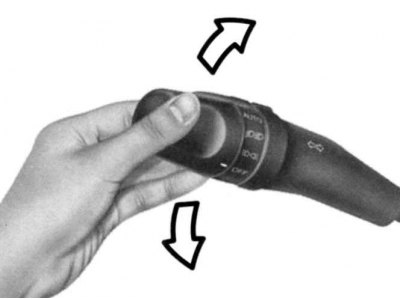
Fig. 1.43. Switch operating mode when changing rows
When changing lanes, move the lever up or down until the turn signals come on. After releasing, the lever automatically returns to the neutral position (Fig. 1.43).
Headlight switch
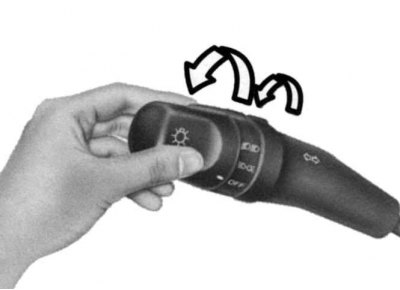
Fig. 1.44. Headlight switch
Turn the tip of the combination switch to turn on the headlights. The first position turns on the parking lights, side lights, tail lights and instrument panel lighting. The next position turns on the headlights (Fig. 1.44).
Note: The headlights are on when the ignition switch is in the "ON" position.
Automatic shutdown of lights in the parking lot
If you do not turn off the parking lights after stopping, they will automatically go out when the driver's door is opened. To turn on the parking lights, you must turn the ignition back on.
Outdoor daytime lighting (additional equipment)
The vehicle may be equipped with daytime running lights. These lights are used to improve visibility of oncoming traffic. These lights are designed specifically to operate when the engine is running and the headlight switch is in the "OFF" position.
Headlight high beam switch
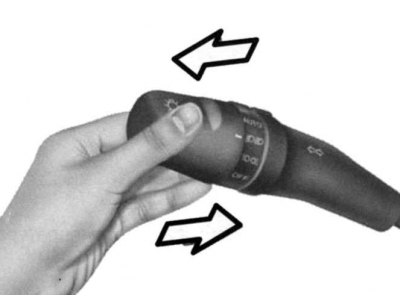
Fig. 1.45. Headlight high beam switch
To turn on the high beam headlights, push the switch away from you. The high beam indicator light on the instrument panel will light. When you move the lever back towards you, the light switches from high to low beam (Fig. 1.45).
Flashing headlights
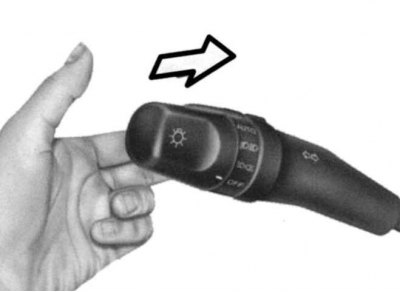
Fig. 1.46. Flashing headlights
Flashing of headlights is performed by slightly moving the switch lever towards you and releasing it. Flashing of headlights is possible even if the headlight switch is in the "OFF" position (Fig. 1.46).
Automatic switching on of external lighting (additional equipment)
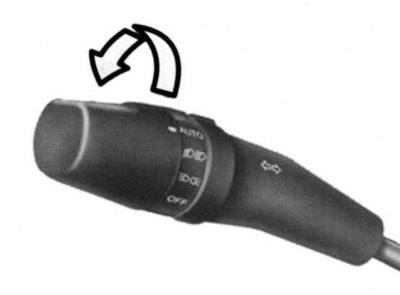
Fig. 1.47. Automatic switching on of external lighting
[The publication is borrowed from the website: HYUNDAIBOOK.ru]
To switch on the automatic exterior lighting, set the selector on the end of the combination switch to the "AUTO" position. Depending on the external lighting, the parking lights, side lights, tail lights, instrument panel lighting or headlights will be switched on (Fig. 1.47).
Note: In cloudy, rainy or foggy weather, turn on the outside lights manually.
Note: Never place any objects over the automatic exterior light switch located on the instrument panel.
Note: Do not clean the sensor using glass cleaner.
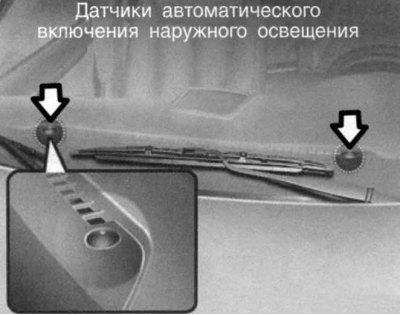
Fig. 1.48. Automatic outdoor lighting switch sensor
If the vehicle has a tinted windshield, the automatic external lighting system may not function properly (Fig. 1.48).