
HyundaiBook.ru
Repair Chevrolet Repair Honda Repair Toyota Repair Land Rover Repair VAZ Repair Renault Repair Nissan
English Русский
Български
Беларускі
Український
Српски
Hrvatski
Română
Polski
Slovenský
Magyar
ArticlesSitemapContacts  


  Accent   Elantra   Getz   Grandeur   Sonata   Santa Fe   Tucson   Others
Sonata 3 (1993-1998) Sonata 4 (2001-2012, petrol)
  • Main
  • Sonata
  • EF (2001-2012)
  • General information
  • User manual
  • Trip computer

Trip computer (Hyundai Sonata EF)

0
1. By pressing the LCD display mode switch button located to the left of the speedometer, you can switch the trip computer readings. To reset the trip computer readings, press the LCD display reset button located to the right of the tachometer.

2. Each short press switches between: "Odometer "A" → "Odometer "B" → "Trip time" → "Average speed" → "Estimated range" → "Odometer "A".
  • a) Trip time. The time countdown starts from the moment the engine is started. To reset the value, press and hold the LCD reset button for 1 second.
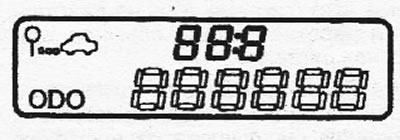
a) Trip time. The time countdown starts…

  • b) Average speed. Shows the average speed of the vehicle since the last reset of the trip time.
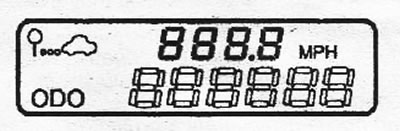
b) Average speed. Shows the average…

  • c) Estimated range. Shows the approximate distance that the fuel in the tank will last. The information is updated after each kilometer. The value is reset after refueling the car.
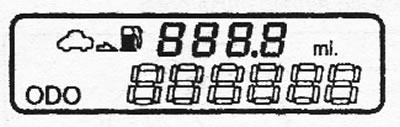
c) Estimated range. Shows the…


Note: if there is less than 50 km of fuel left in the tank, the mileage readings for the remaining fuel will be replaced by an indication of the type "--" and the indicator of this mode will flash.
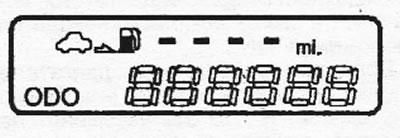

Note: if there is less than 50 km of…
This article is available at russian, bulgarian, belarusian, ukrainian, serbian, croatian, romanian, polish, slovak, hungarian
This article has been reviewed by: Konstantin Smirnov
Add to social network:

Previous
Sonata 4: User manual
Next

Odometer and trip meters (models without trip computer)
Standard anti-theft system
Central lock
Side door lock blocking
Door lock
Tachometer (rotation speed)
Fuel quantity indicator
Coolant temperature gauge
Instrument cluster indicators
Layout of components in the front of the cabin
We recommend other articles on the topic of Hyundai manuals:

On-board computer (optional) Hyundai Accent 3 (2005-2010)
Instrument cluster (vehicles without trip computer) Hyundai Elantra 3 (2000-2006)
Trip computer Hyundai Getz (2002-2011)
On-board computer (additional equipment) Hyundai Tucson 1 (2005-2010)

Link in different formats to this article

Visitor comments
No comments yet


How much will 31 + 44 ?


Sonata 4 (2001-2012, petrol) 
  • General information
  • User manual
  • Maintenance
  • Power unit
  • 2.0 and 2.4 liter engines
  • 2.7 liter engines
  • Engine overhaul
  • Cooling system
  • Intake and exhaust systems
  • Lubrication system
  • MFI fuel injection system
  • Engine electrical equipment
  • Transmission
  • Clutch
  • Mechanical gearbox
  • Automatic gearbox
  • Drive shafts
  • Chassis
  • Front suspension
  • Rear suspension
  • Steering
  • Brake system
  • Body
  • Exterior
  • Interior
  • Heater and air conditioner
  • Security systems
  • Electrical equipment
  • Troubleshooting
  • Electrical circuits
Sonata 3 (1993-1998) 
  • General information
  • Maintenance
  • Power unit
  • Engine repair I4 DOHC
  • Engine repair I4 SOHC
  • Engine repair V6 SOHC
  • Cooling system
  • Intake and exhaust system
  • Exhaust gas treatment
  • Fuel system
  • Transmission
  • Clutch
  • Mechanical gearbox
  • Automatic transmission KM-175
  • Automatic transmission F4A33
  • Chassis
  • Front suspension
  • Rear suspension
  • Steering
  • Brake system
  • Body
  • Body elements
  • Electrical equipment
  • Equipment and devices
HyundaiBook.ru © 2018-2026 · Mobile version · Sitemap: EN BG BY UA RS HR RO PL SK HU · Administration · Site search · Hyundai owners Accent 1 · Accent 2 · Accent 3 · Elantra 1 · Elantra 2 · Elantra 3 · Getz · Sonata 3 · Sonata 4 · Santa Fe 2 · Tucson 1 · Tucson 2 · Matrix ·
This site uses cookies to optimize its functionality. By continuing, you agree to our terms.