
HyundaiBook.ru
Repair Chevrolet Repair Honda Repair Toyota Repair Land Rover Repair VAZ Repair Renault Repair Nissan
English Русский
Български
Беларускі
Український
Српски
Hrvatski
Română
Polski
Slovenský
Magyar
ArticlesSitemapContacts  


  Accent   Elantra   Getz   Grandeur   Sonata   Santa Fe   Tucson   Others
Santa Fe 2 (2007-2012, petrol)
  • Main
  • Santa Fe
  • CM (2007-2012)
  • User manual
  • Car driving
  • 4WD all-wheel drive locking system (models with electronically controlled 4WD all-wheel drive)

4WD all-wheel drive locking system (models with electronically controlled 4WD all-wheel drive) (Hyundai Santa Fe CM)

0
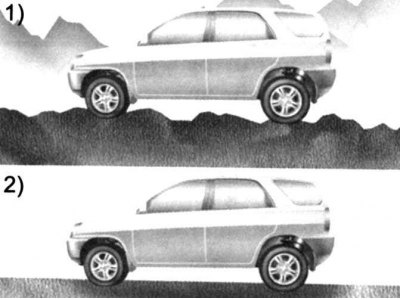
Fig. 1.189. Examples of turning on and…

Fig. 1.189. Examples of turning on and off the all-wheel drive lock


The 4WD system automatically distributes the power transmitted to the wheels according to road conditions. In off-road or slippery conditions, press the 4WD lock switch to engage full-time 4WD, which distributes power 50:50 between the front and rear wheels. The 4WD lock indicator light on the instrument panel will illuminate.

This operating mode is cancelled as soon as the vehicle speed exceeds 30 km/h and this function is completely switched off at speeds above 40 km/h. Conversely, the function is restored as soon as the vehicle speed drops below 40 km/h and is completely resumed at speeds below 30 km/h.

To disengage the 4WD lock mode, press the 4WD lock switch again.

The 4WD lock indicator light on the instrument panel will go out.

When the 4WD lock switch is pressed while driving on uneven surfaces, the engine power is distributed equally to the front and rear wheels. The 4WD lock is activated when the driving speed does not exceed 40 km/h.

When driving the vehicle on a level surface, disengage the 4WD drive lock.
This article is available at russian, bulgarian, belarusian, ukrainian, serbian, croatian, romanian, polish, slovak, hungarian
This article has been reviewed by: Konstantin Smirnov
Add to social network:

Previous
Santa Fe 2: Car driving
Next

Operation of permanent all-wheel drive (4WD)
Electronic Stability Program (ESP)
Anti-lock braking system
Automatic transmission (4 and 5 speed)
Manual transmission control
Correct braking techniques
Economical driving
Towing a trailer or car
If the engine does not start
Starting the engine from an external source
We recommend other articles on the topic of Hyundai manuals:

Central wheel locking, remote control and anti-theft alarm… Hyundai Accent 3 (2005-2010)
Steering, front wheel drive — checking the dust boots of the… Hyundai Elantra 1 (1990-1995, petrol)
Front Wheel Drive Specifications Hyundai Getz (2002-2011)
Anti-lock Brake System — Wheel Speed Sensor — Removal and Testing Hyundai Sonata 3 (1993-1998)
Rear axle coupling (all-wheel drive vehicle) — device Hyundai Tucson 1 (2005-2010)
Replacing the wheel drive shaft seal Hyundai Matrix (2001-2010, petrol)

Link in different formats to this article

Visitor comments
No comments yet


How much will 39 + 13 ?


Santa Fe 2 (2007-2012, petrol) 
  • User manual
  • Control devices
  • Heating and ventilation
  • Seat control
  • Car driving
  • Maintenance and care
  • Vehicle Specifications
  • Engine 2.0 and 2.4 liters
  • Engine specifications
  • Engine maintenance
  • Engine repair
  • Cooling system
  • Intake and exhaust system
  • Fuel system
  • Engine 2.7 liter
  • Engine maintenance
  • Engine repair
  • Cooling system
  • Intake and exhaust system
  • Transmission
  • Transmission specifications
  • Mechanical gearbox
  • Automatic gearbox
  • Drive shafts
  • Chassis
  • Suspension and wheels
  • Steering
  • Brake system
  • Body
  • Exterior (external elements)
  • Electrical equipment
  • Equipment and devices
  • Power devices
  • Specifications
HyundaiBook.ru © 2018-2026 · Mobile version · Sitemap: EN BG BY UA RS HR RO PL SK HU · Administration · Site search · Hyundai owners Accent 1 · Accent 2 · Accent 3 · Elantra 1 · Elantra 2 · Elantra 3 · Getz · Sonata 3 · Sonata 4 · Santa Fe 2 · Tucson 1 · Tucson 2 · Matrix ·
This site uses cookies to optimize its functionality. By continuing, you agree to our terms.