


Contents: Controlling the compass function ⇓ Setting up the compass ⇓ Additional mirror ⇓ Parking brake ⇓ Parking brake - type A ⇓ Parking brake - type B ⇓
The electrically operated interior rearview mirror automatically monitors the glare from the headlights of vehicles behind. Pressing and holding the button for 3 to 6 seconds turns on the auto-dimming function of the mirror; pressing and holding the button again turns off the auto-dimming function.
Controlling the compass function
Press and release the button - the display will show the direction of travel of the car. When you press the button again, the display of the direction of travel will go out.
Designation of vehicle direction indications:
- E - East;
- W - West;
- S - south;
- N - north.
Intermediate values (example):
- NE - northeast.
Setting up the compass
Press and hold the button for more than 9 seconds. When the compass memory is cleared, the display will show the symbol "C".
[The original can be read on the resource HyundaiBook.ru]
Drive the vehicle two full circles at a speed of less than 8 mph or until the direction of travel appears on the display.
If the compass adjustment is not complete, drive the vehicle in full circles in opposite directions.
If the compass adjustment is not complete after this, repeat the procedure.
Additional mirror
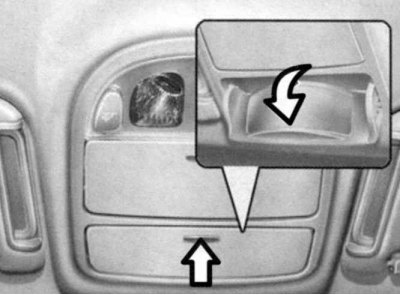
Fig. 1.91. Additional mirror
An additional mirror serves to make it easier for front passengers to communicate with those in the back without having to turn around to face them.
To use the additional mirror, press the panel and open the mirror. Set it to the desired position. After use, close the panel.
Warning! Do not adjust the mirror position or talk to passengers for a long time while driving. You may lose control of the vehicle, which in turn may lead to a traffic accident (crash).
Parking brake
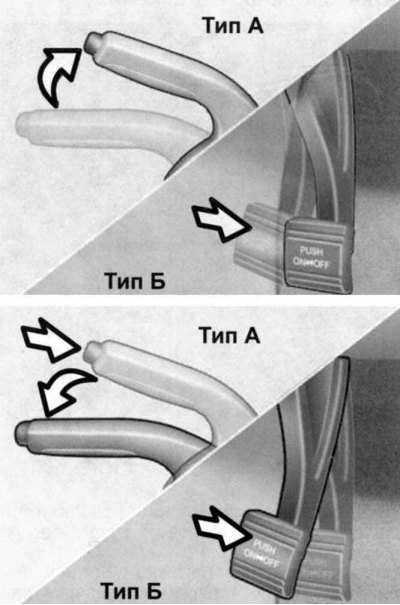
Fig. 1.92. Parking brake engagement diagram
Always set the parking brake before leaving the vehicle. When the parking brake is set with the ignition switch in the "ON" or "START" position, the parking brake indicator light on the instrument panel will illuminate. Before driving, make sure the parking brake is completely released and the indicator light is off.
To apply the parking brake, press the parking brake pedal. To release the parking brake, press the parking brake pedal again.
Always set the parking brake before leaving the vehicle. When the parking brake is set with the ignition switch in the "ON" or "START" position, the parking brake indicator light on the instrument panel will illuminate. Before driving, make sure the parking brake is completely released and the indicator light is off.
Parking brake - type A
To engage the parking brake, pull the lever up until it stops.
To release the parking brake, pull the parking brake lever up slightly and press the button at the end of the handle. Then, while pressing the button, lower the lever down.
Parking brake - type B
To apply the parking brake, press the pedal.
To release the parking brake, press the pedal again.
Note: Check the parking brake pedal travel periodically.